


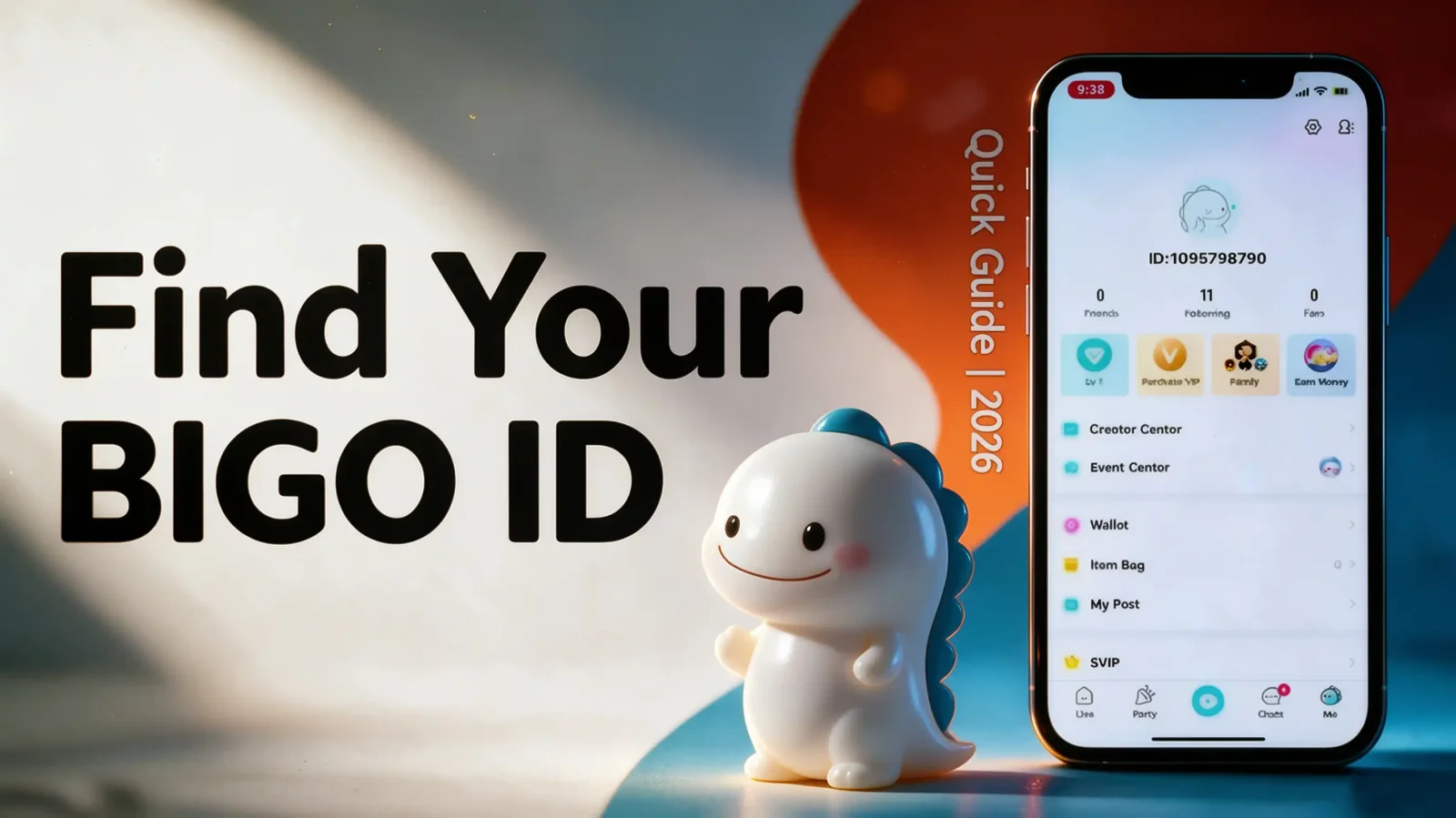
How to Find Your BIGO Live User ID (Bigo UID)

ရေးသားသူ: Jasper


အကောင်းဆုံး Bigo Live ထုတ်ကုန်ကို ရွေးပါ။


One thing trips people up before they get that far. "BIGO ID" means different things on different pages. Read a top-up site and it is the value printed under your profile. Read BIGO's own setup guide and it is the name you typed at sign-up. Both usages are official, which is exactly why swapping them happens so often — and why a rejected order is usually a terminology problem rather than a typo.
Finding the value takes about thirty seconds. Understanding what you found is the rest of this guide.
Key takeaways
- The value sits under your display name, on your profile page, inside the Me tab. Tap Me, tap your avatar, read the
ID:line. - "BIGO ID" is ambiguous. BIGO's setup guide uses it for the name you picked; top-up platforms use it for the number on your profile.
- The name can change, but BIGO says "most regions", "usually only a limited number of times", and some accounts get one free change. It is neither unlimited nor locked.
- The number that appears by default has no documented change path anywhere in the app or on bigo.tv. Anyone charging a fee to change it is selling you nothing.
- BIGO publishes no digit count. Real profile IDs run from 7 to 10 digits.
- In-app purchases don't need the value. You're already logged in.
What Is a BIGO Live User ID (Bigo UID)?
The value BIGO prints under your display name, prefixed ID:. By default it's a run of digits. It is the only identifier a third-party top-up platform will accept, and it also appears inside public profile URLs, which take the form bigo.tv/ followed by the number.
Three details matter more than they look:
- It attaches to your account rather than your name. Two people can hold an identical nickname; neither can hold someone else's number.
- It is public. Anyone with the number can open your profile. That is by design, which is why it is safe to hand to a top-up service — covered in Is It Safe to Share Your BIGO ID?
- "By default" is doing real work in that first sentence. You can replace this value with a username, which changes what top-up sites expect. ID or Username: Which One Can You Actually Change? covers exactly that.
BIGO Live launched in 2016 and operates in more than 150 countries.
Where to Find Your BIGO ID in the App (30 Seconds)
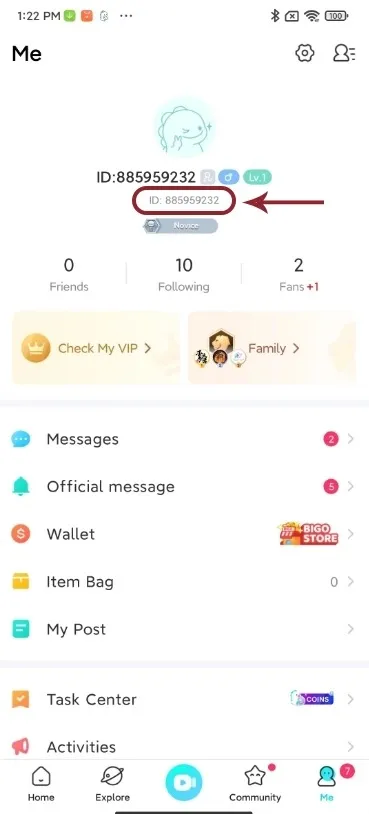
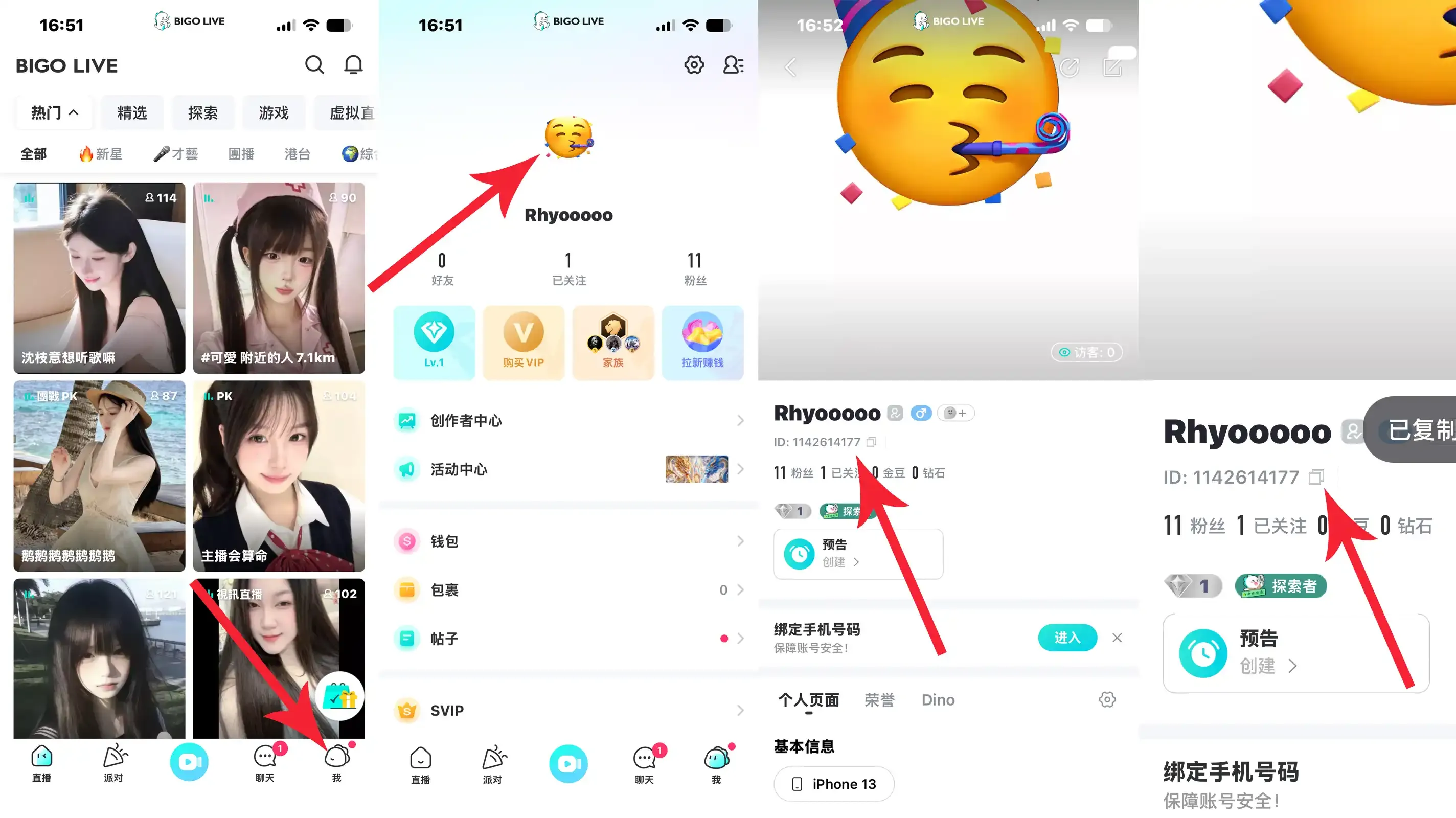
Tap Me in the bottom-right corner, open your profile, and read the value directly beneath your nickname. It appears as ID: 123456789. Tap it to copy. Strip the ID: prefix before pasting anywhere — that label is display text, not part of the value.
The sequence, with the parts that cause trouble called out:
- Log in first. A guest session won't show a profile tied to your account.
- Tap the avatar in the top-left of the home screen. On most builds this opens your own profile. If it doesn't, tap Me in the bottom navigation bar first.
- Look below your display name. The value sits in smaller, lighter text than your name.
- Tap to copy it, then paste it into a plain text note. You will want it more often than you expect.
- Read it back from the screen before using it. Not from memory.
Unsure the value you found is the one you need? What Does Your BIGO ID Look Like? comes next — it covers why the length can't be checked against a template.
BIGO ID vs Username: Which One Does a Top-Up Form Want?
A top-up form wants the value under ID:. The two are not interchangeable, and they get conflated because both are things people call "my account."
| Dimension | Value under ID: | Display name |
|---|---|---|
| Format | Digits by default, length varies | Letters, numbers, emoji, symbols |
| Example on profile | ID: 3931348 | MGI All⭐️ Bé Biu |
| Unique across the platform? | Yes, one per account | No — duplicates are common |
| Accepted by third-party top-up sites? | Yes, the only accepted value | No, rejected as invalid |
| What BIGO's setup docs call it | Never named at all | "BIGO ID" |
| Changes when you rename? | No | Yes |
| Changeable by you? | No documented way | Yes, a limited number of times |
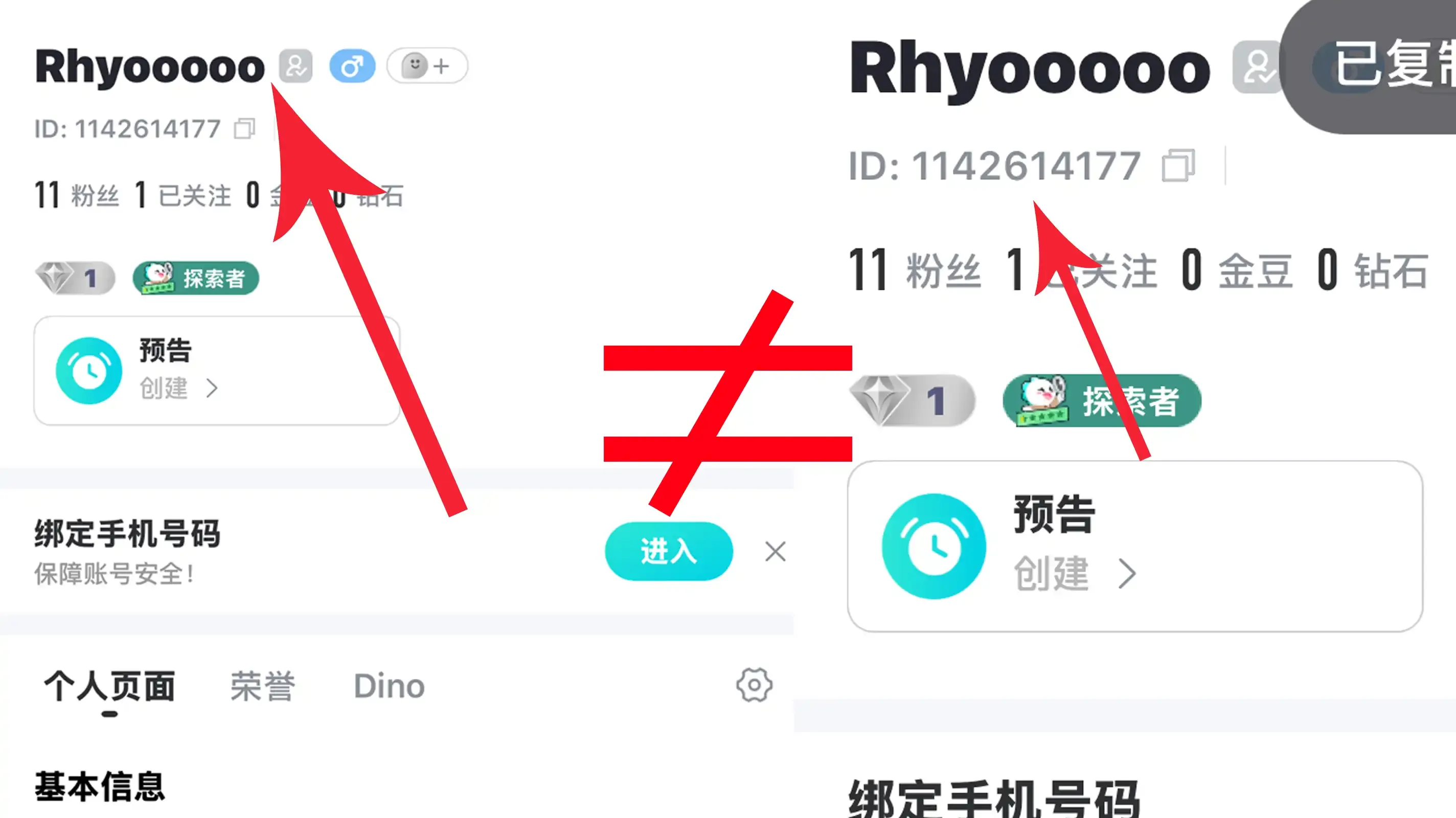
Take a host who goes on-stream and asks regulars to top him up. Two of them message him the same evening. One types his display name into the ID field and the order bounces back as invalid. The other copies the number from the link in his bio, and that one lands. Nothing about the account changed between the two attempts. Only the pasted string differed.
So paste it rather than typing from memory, and don't assume a nickname and a profile ID are interchangeable just because both of them identify you.
What Does Your BIGO ID Look Like? (No Fixed Digit Count)
BIGO has never published a digit count. The guides contradicting each other online aren't quoting a specification — there's no specification to quote. BIGO's own account setup guide, the page that defines what a BIGO ID is, says nothing about length.
Every digit-count claim currently in circulation, with its source:
| Claim you will find online | Where it comes from | Verdict |
|---|---|---|
| "Always 9 digits" | Copied from one invented example | ⚠️ Unsupported |
| "8 to 9 digits" | Template copy | ⚠️ Unsupported |
| "8 to 10 digits" | Template copy | ⚠️ Unsupported |
| "8 to 12 digits" | Template copy | ⚠️ Unsupported |
| "7 digits" | Template copy | ⚠️ Unsupported |
| Whatever your own profile shows | Your account | ✅ The only reliable source |
For real examples, we pulled fifteen public profile URLs from bigo.tv's front page on 12 October 2026 and read the number out of each one. The shortest was seven digits, the longest ten, with no clean pattern tied to country, language, or account age. Fifteen is a small sample and we won't pretend otherwise. What it establishes is enough: no single digit count describes a BIGO ID.
The number 901873661 turns up constantly in top-up guides and recharge pages. Someone wrote it once as an illustration and everyone copied it. It isn't an official format, and it isn't a real account. 901216366, recycled just as widely, has the same problem.
The one rule that holds
Enter exactly what your own profile shows, digit for digit. Padding or trimming it will get the order rejected.
There's a free way to check, and it's more reliable than a screenshot: type your value into a browser as bigo.tv/yourIDhere. If it's right, the URL resolves to your profile. If you've transposed a digit, it resolves to nothing, or to somebody else. Players report this pattern rather than BIGO documenting it, so read a clean result as strong evidence and a broken one as a prompt to re-check the app.
The One-Minute Self-Check
Before the value goes anywhere near a payment form:
- Open your profile in the app and read the ID.
- Copy it with a tap.
- Paste it into a plain text note so the
ID:label doesn't come along. - Paste that into the address bar as
bigo.tv/plus the number. - Confirm the page that loads is yours — same avatar, same display name.
This catches the two errors that actually happen: a dropped digit and a transposed pair. Either one sends the URL somewhere other than your profile, so a stranger's face on screen tells you the string is wrong before you pay.
Where to Find Your BIGO ID on iPhone, Android, and the Web
The location never changes: under your display name, prefixed ID:. Only the route there does. Menu labels differ between versions and regional builds, so if a step doesn't match your screen, aim for the destination rather than the label.
On Android
Tap Me at the bottom right, then your avatar. The ID sits directly beneath your nickname. Tap it to reach the clipboard, or long-press the row if your build allows.
If the row is rendering oddly, clear the cache first: Settings → Apps → BIGO Live → Clear Cache. This resolves a fair share of "the number isn't there" reports without touching your account.
On iPhone
Tap Me, tap your avatar, read under the name. Identical to Android, tap-to-copy included. The difference is cosmetic: iOS shows a brief paste confirmation banner.
If storage is tight, Settings → General → iPhone Storage → Offload App reclaims space without deleting your account. Reinstall from the App Store and sign back in.
On the web version
bigo.tv does display your ID, though it's the least stable of the three interfaces and changes more often than the app does. QR login is the path most people find least painful:
- Go to bigo.tv and choose Login.
- Select Scan QR Code.
- On your phone, open Me and tap the scan icon near the top of your profile.
- Scan with the phone. The web session inherits your app account.
This skips web password entry, which is where the friction usually lives. If something looks different from the description here, look for the profile section rather than a literal button label.
When your build names things differently
Some builds route through Me → Settings → Account Management, others through Me → avatar → Edit, others through an Edit Profile entry. They all land on the same screen. If your version appears to be missing the ID entirely, update the app before assuming it was removed.
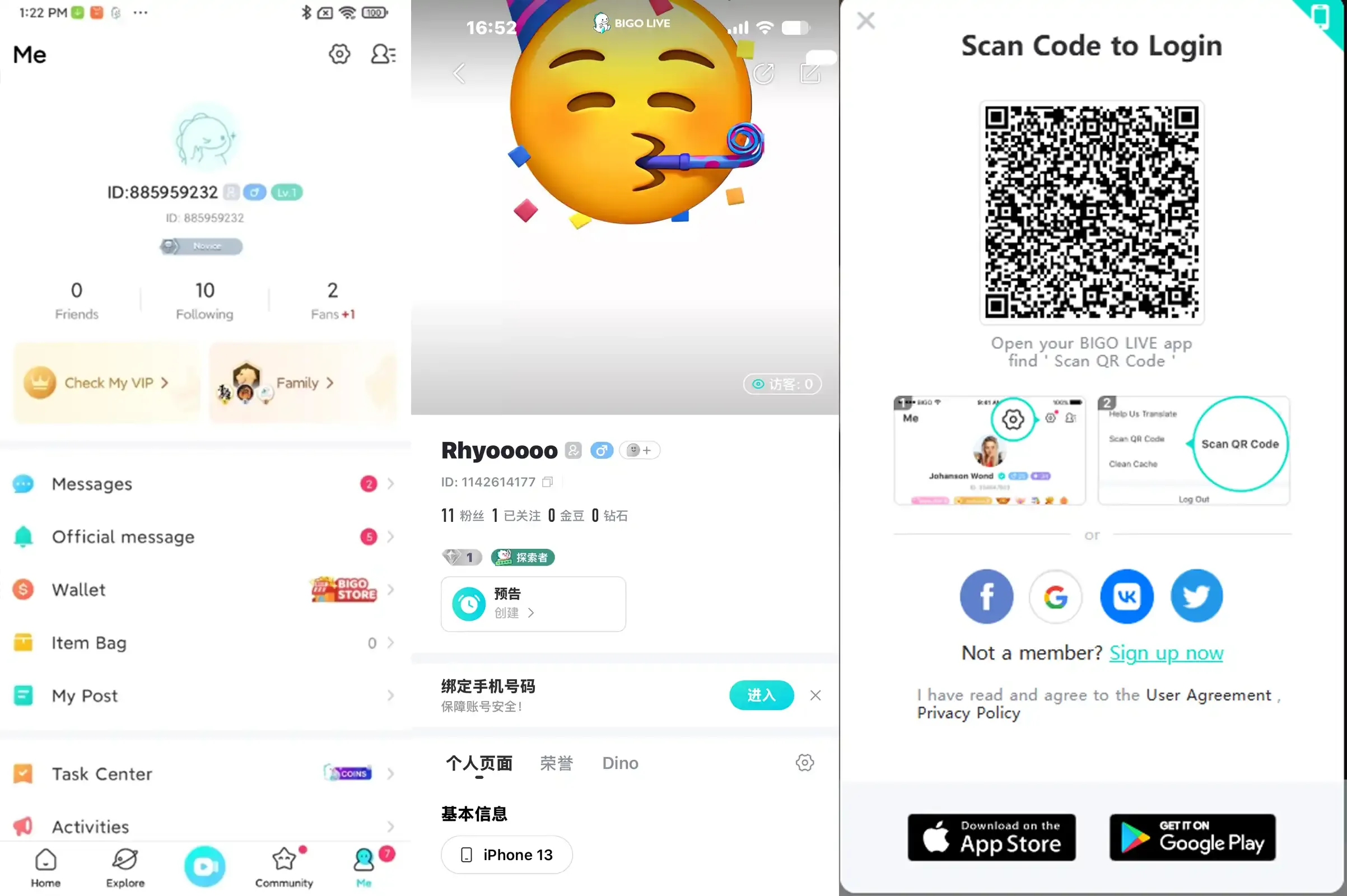
Why Can't I See My BIGO ID?
The common causes are narrow. You're on someone else's profile instead of your own, or signed into a different account than the one you're thinking about. Less often the app is too old to render the row, or a cache glitch has blanked it. Confirm you opened Me rather than a search result or a host card, then clear the cache, sign out and back in, and update.
If that doesn't clear it, work down the list:
- You're not looking at your own profile. Open Me directly rather than tapping a search result or a host card. Guest sessions and secondary accounts don't carry the ID of the account you're thinking of.
- You're not deep enough. The ID is under the display name. It isn't in settings or the wallet, and it isn't on the home feed. Scroll your profile slightly if the row looks clipped.
- The app is out of date. Update to the current version. Older builds render the row inconsistently, and ruling this out costs nothing.
- Cache or rendering glitch. Clear the cache using the paths above, then sign out and back in. A reinstall is the nuclear version of the same fix.
- The account was just created. Some users report that a freshly registered account shows the row a short while after sign-up. That's community experience rather than anything in BIGO's documentation, so treat it as "wait and check again." If it's been more than a few minutes, contact support.
- You're reading a number that isn't your account ID. Live rooms show room numbers, gift-coin balances, and viewer counts. Gift leaderboards show other people's IDs.
Where to get help
Go through the app rather than hunting for an email address: Me → Help & Feedback. In-app tickets carry your device and app details automatically, which usually speeds the reply up.
Some third-party pages list [email protected], and that address appears nowhere on BIGO's own support pages. The published address is [email protected] — confirmable on their official support center page before you send anything sensitive.
Case 4 usually looks like this: the profile showed the ID for months, an app update lands, and the row goes blank. A reinstall fixes it in about five minutes. Nobody has identified the trigger.
If the ID was right and the top-up processed but your balance hasn't moved, that's a different problem — the official BIGO support center covers that case.
Can You Find Someone's BIGO ID by Their Nickname?
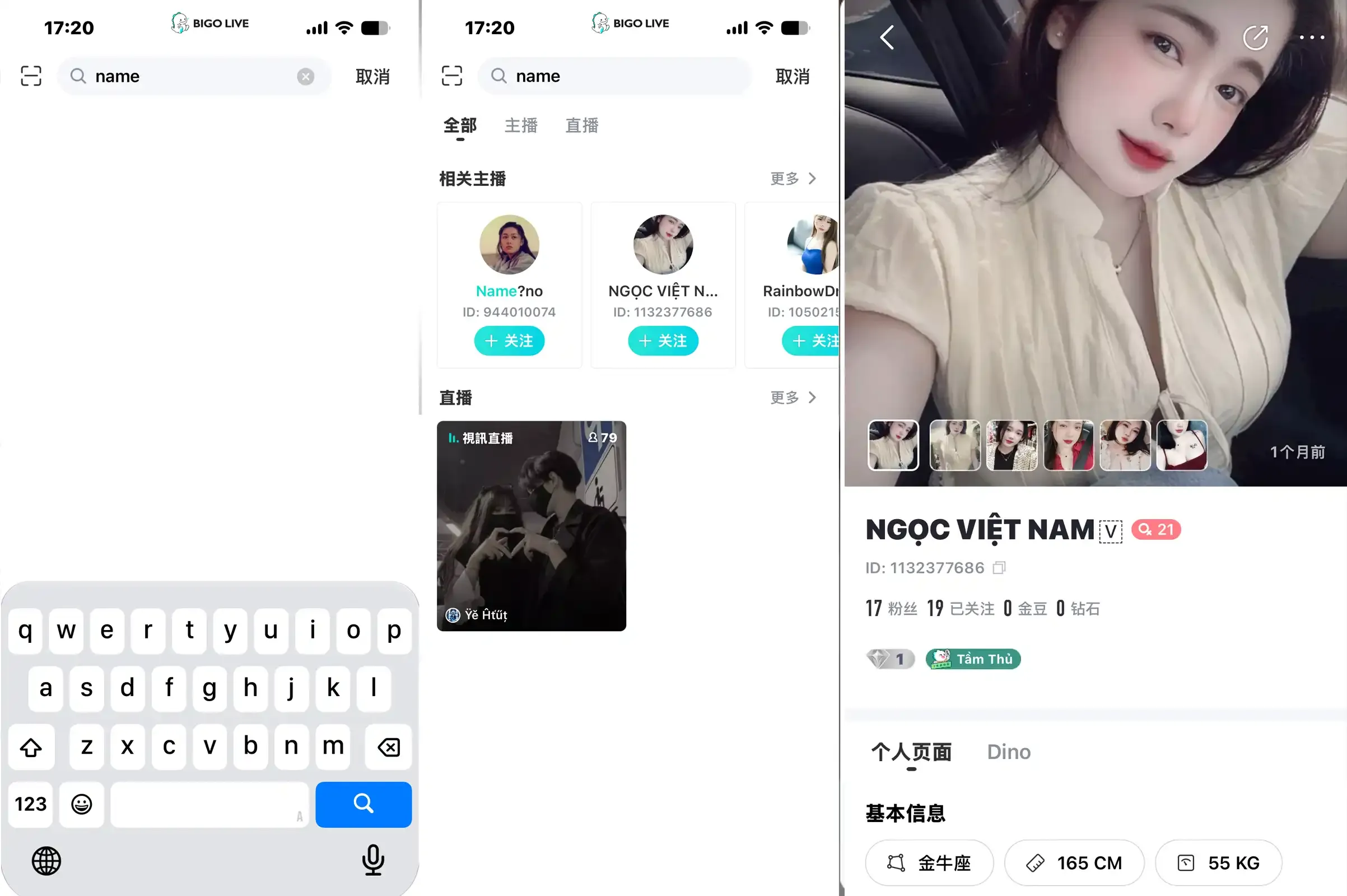
You can't convert a nickname into a number. You can search for the nickname, open the profile that comes back, and read the number off it. BIGO's search field accepts either a display name or a number.
- Tap the magnifying glass on the home screen.
- Type the display name, or the number if you have it.
- Open the profile from the results.
- Read the value under the display name.
The complication is that display names aren't unique, and emoji-heavy ones are harder to tell apart rather than easier. The top result isn't necessarily the person you meant. In our fifteen-profile sample from bigo.tv, names like お疲れ様🤗 さおりん🏥🌡️ and 夜🌙ملكه كابلي 👸 sat close enough together to be misread at a glance. So check before you act:
- Compare the avatar and the bio, not just the name.
- Check recent activity. A profile with a live room running right now is usually the right one.
- Ask the person to confirm their number. Nobody legitimate will mind.
- Don't transcribe a name off a floating banner in a live room. Those are easy to misread at speed.
Once you're on the profile, the number is right there. That's the limit of "reverse lookup by nickname" — you're reading a public field off a public page, not deriving anything.
BIGO ID or Username: Which One Can You Actually Change?
BIGO publishes a tutorial titled How to Change Your Bigo ID, and its opening line settles the question:
"Many Bigo Live users start with a default ID made of random numbers. This can feel impersonal and hard to remember. If you want to change your Bigo ID to a unique, catchy username..."— How to Change Your Bigo ID, published 11 June 2025, updated 4 February 2026
BIGO calls that field "BIGO ID." A new account starts with a default value — the random numbers under your profile. Replace it with a custom username and the field shows something else entirely. The official walkthrough is Me, then the pen icon at the top-right, then scroll to the "Bigo ID" option, enter the new value, Save.
On how often you can do that, BIGO's setup guide is less absolute than most third-party pages suggest:
"Can I change my BIGO ID later? — In most regions you can change it but usually only a limited number of times. Some users get one free change and later changes may require a fee or may be restricted."— BIGO LIVE Tutorial: How to Use BIGO LIVE, published 11 June 2025, updated 4 February 2026
Note what that does not say. It doesn't promise one free change as a universal rule, and it doesn't claim the field is locked forever. "Most regions," "usually," "some users" — the limits are real but conditional.
| Account state | What appears in the BIGO ID field | What top-up sites call it |
|---|---|---|
| Never customized (default) | Random numbers | "the ID" / "the number" |
| Customized by the user | A chosen username | "the nickname" |
This explains the confusion. Accounts that never changed the field show digits, so their owners call it an ID. Change yours to a username and you start calling it a nickname. Same field either way — then a top-up form asks for "the ID" and the two of you are talking past each other.
| Question | What the sources actually support |
|---|---|
| Is the default value random numbers? | Yes. BIGO states new accounts "start with a default ID made of random numbers." |
| Can I replace it with a username? | Yes. BIGO publishes a step-by-step tutorial for exactly this. The setup guide notes limits on how many times. |
Is my BIGO ID field guaranteed to be numeric? | No — not if you customized it. If you changed it, a top-up form may need your username, not a number. |
| Will support change it for me? | Nothing in BIGO's published documentation promises this. |
| Should I pay someone to change it? | No. If a service offers to change your account ID, it is either describing the field above or selling something it cannot deliver. Watch out |
If you ever changed your BIGO ID, the number other guides tell you to copy may not be what your field contains. Open it, look at what's really there, and enter that — digits or username, exactly as shown.
If you genuinely need a different value, say for privacy or a seller account you'd rather not be associated with, the route is Me → Help & Feedback or [email protected], the address BIGO publishes on its official support center page. Ask them directly whether it's changeable on your account. A written answer from BIGO beats any third-party page, this one included.
What Do You Actually Need Your BIGO ID For?
Only when someone else has to act on your account: third-party top-ups, topping up for another person, account recovery or appeal, support tickets. Buying inside the app doesn't require it because you're already logged in, and gifting diamonds in-app lets you pick the recipient yourself.
Vocabulary
Diamonds are what viewers spend on gifts and paid events. Beans are the host-side balance those gifts accumulate into. Neither is an identifier, and they aren't interchangeable.
| Situation | Do you need your ID value? | Notes |
|---|---|---|
| Buying diamonds inside the app | No | You're logged in; the purchase is tied to your session |
| Topping up through a third-party site | Yes | The value is the only identifier they accept |
| Buying diamonds for someone else | Yes, theirs | You need their ID. Not their password, phone, or login session |
| Account recovery or appeal | Yes | Along with the phone number or email on the account |
| A support ticket | Yes | It's the first thing an agent will ask for |
| Gifting diamonds in-app | No | You pick the recipient in the app UI |
| Referring a friend | No | Your share link and code carry it |
The third row goes wrong in both directions. Some people assume gifting requires handing over a login. It never does. Others assume it isn't possible at all, because the app only offers a "buy for me" button. BIGO Live diamond recharge for another account works because the ID identifies whose account receives the diamonds. BIGO's official recharge page makes the same point about its direct-ID method: "Simply enter a Bigo ID number. No password or OTP required."
How to Top Up BIGO Live Using Your ID Without Getting It Wrong
With the value copied, topping up BIGO Live diamonds is straightforward. The failure modes live in the ten seconds before you pay.
- Copy-paste. Don't type. Nine digits read off a screen and entered from memory is nine chances to transpose a 3 and an 8. Paste it instead.
- Strip the prefix. Your profile says
ID: 3931348. The form wants3931348. - Digits only. No spaces, no dashes, no full-width characters. If you copied from a chat message where someone pasted with formatting, land it in a plain text field first and check.
- Read it back before paying. Compare the pasted value against your profile one character at a time, right to left. Reading left to right is where the eye skips.
- Choose the amount first. Compare BIGO Live diamond packages and pick before you touch the ID field. Deciding what you're buying with a half-filled form is how people end up with the wrong pack size.
- One order at a time. Don't submit a second order while the first is processing. That's how you end up with twice the diamonds you intended.
- Confirm you're on the right domain. Check the URL before entering your ID. Phishing pages that steal IDs are trivially cheap to build.
- If you already sent it to the wrong place
Move fast and don't assume a refund. Policies on correcting misdirected digital currency are inconsistent, and the working assumption should be that delivered funds are gone.
Contact support through Me → Help & Feedback or [email protected]. Have your correct ID, the wrong one you entered, the order reference, and the payment receipt ready, plus the payment time with your time zone. That last item is what support asks for last and needs most, since it decides which payment window they look at.
A common version of this: someone reads their ID off a screenshot taken months earlier, when the digits blurred together. The order goes through, the diamonds land on a stranger's account, and there is no version of this where they come back. Contacting the recipient directly is realistically what the outcome comes down to.
Is It Safe to Share Your BIGO ID?
Yes. Your profile ID is public by design, and sharing it exposes nothing you haven't already put on your profile. Nobody can take over your account with it, because it isn't a credential. What it does do is make you findable.
| ✅ Safe to share | ❌ Never share, including with "support" |
|---|---|
| The numeric ID itself Your profile link, which contains the ID Your display name and avatar, already public Your ID with a support agent or a top-up service you're deliberately using | Your account password SMS or email one-time codes Your full card number, CVV, or bank login Screen-sharing or remote-control permissions Government ID documents |
One caveat worth naming: the ID is harmless in itself, but it lets people find and contact you. Some people keep it out of wide-open public forums for that reason alone. A DM or a support ticket works fine instead of a public thread.
Support agents will ask for your ID. They will not ask for your password or a one-time code. Anyone who does is not BIGO.
Why Can't I Top Up BIGO Live in My Country?
Payment availability turns on your country, the region your account was registered in, the currency you're paying in, and whether you're on iOS or Android. Stores differ, gateways differ, and the available methods can shift between app versions.
Some accounts aren't supported by every top-up channel depending on where they were registered. That's real, but it varies by account rather than mapping onto a list of countries you can memorise — so we're not going to hand you one. The payment screen in front of you is the reliable source.
- Check the payment options inside your app. That's the authoritative list for your account.
- Turn off VPN before paying. A mismatch between your apparent location and your account's registered region is a common trigger for declines.
- Match your store to your account. An iOS account bought through Google Play billing is a genuinely different flow.
- Try the platform-native route first. If in-app purchase works, it's usually faster and more reliable.
The official BIGO support center explains how to open a ticket that gets answered quickly when the in-app options don't resolve a failure. Whichever route you take, go through Me → Help & Feedback and attach a screenshot. Agents can see payment availability for your specific account; a generic guide can't.
Frequently Asked Questions
How do I find my BIGO Live user ID?
Tap Me, then open your profile. The value appears directly under your display name as ID: followed by digits. Tap to copy, then strip the ID: prefix before pasting. Android and iPhone behave identically, and bigo.tv shows it too, though its menus change more often.
Is BIGO ID the same as my username?
No, and this is where most guides go wrong. Your display name is text you chose; it isn't unique, and other users share it. BIGO's setup guide calls that name your "BIGO ID," while the recharge page asks for a "Bigo ID number." Both are official wording, and neither means the other.
Why is my BIGO ID not showing?
The common ones: you're not on your own profile page, you're logged into a different account than you think, or the app is out of date. Clear the cache, sign out and back in, then update. Two rarer cases — a brand-new account that hasn't populated the row yet, or a number that isn't yours at all — are covered in the six-step list above.
How many digits is a BIGO ID?
BIGO hasn't published a fixed count. Fifteen public profiles pulled from bigo.tv on 12 October 2026 ranged from 7 to 10 digits. Guides claim 7, 8-9, 8-10 or 8-12; none of those come from an official spec. Type exactly what your profile shows.
Can I change my BIGO ID?
It depends on which thing you mean. The display name, yes — BIGO's tutorial walks through it, and the setup guide says most regions allow a limited number of changes with some users getting one free. The number that appears by default, no: there's no documented change path in the app or on bigo.tv, and no menu offers one. Don't pay anyone who claims they can change the number.
Where is my BIGO ID on iPhone and Android?
Same place on both: under your display name, reached via Me then your avatar. Only the copy interaction differs slightly. If the row is missing, clear the cache and sign out and back in before assuming the app dropped it.
Can I find someone's BIGO ID by their nickname?
Not by conversion, by search. Type the display name into the home screen search, open their profile, and read the number. Names aren't unique and can look alike, so check the avatar and bio, and confirm with the person before acting.
Is it safe to share my BIGO ID?
Yes, it's public and it isn't a credential. Never share your password, SMS or email codes, card details, or remote device access, including to anyone claiming to be support. It does let people find and contact your profile, so prefer a DM or a support ticket over a public thread.
Do I need my BIGO ID to top up diamonds?
In-app purchases, no, because you're already logged in. Third-party top-ups, yes, the value is the only thing they'll accept. Topping up for someone else requires their ID and never their login details. BIGO's official recharge page states no password or OTP is required.
Why do I see an "Invalid ID" error when topping up?
Most often a display name went in where the value was expected, or the ID: prefix stayed attached. Less commonly it's a transposed digit or spaces in the field. Copy straight from your profile, land it in a plain text field first, then compare right to left before paying.
Where can I find my Bigo ID on the web version?
Log in at bigo.tv, preferably by scanning the QR code with your phone from the Me tab, then open your profile. The layout changes more often than the app does, so look for the profile section rather than a fixed button label.
Why can't I top up in my country?
Payment options depend on country, registration region, currency, and platform. Check what your app offers, turn off your VPN, and make sure you aren't mixing an iOS account with Android billing. In-app purchase usually has the widest coverage.
Why does everyone call my username and my ID the same thing?
Because BIGO's own pages do. The setup guide calls the name you pick your "BIGO ID" and explains how to change it, while the recharge page asks for a "Bigo ID number." Both are official wording, so any guide that cites "BIGO ID" without saying which one it means will leave you guessing.
Sources
All four are official BIGO pages, linked above where they're cited.
| Source | Published | Updated |
|---|---|---|
| BIGO LIVE Tutorial: How to Use BIGO LIVE | 11 June 2025 | 4 February 2026 |
| How to Change Your Bigo ID | 11 June 2025 | 4 February 2026 |
| BIGO LIVE Official Recharge Guide | 30 May 2025 | 4 February 2026 |
| BIGO LIVE Support Center | 18 April 2025 | 15 July 2026 |
About Grecharge — Grecharge is a game and live-streaming top-up platform, and BIGO Live diamonds are one of the products we support. We publish guides like this one after checking BIGO's official pages ourselves, and we never ask for your password or OTP. See the diamond packages we support →
Other live-streaming apps we support: Poppo Live coins top-up and Mico Live coins top-up.
Last updated: 12 October 2026. The "can you change it" section was rewritten after checking BIGO's official pages directly, and the terminology was corrected to match what BIGO actually publishes. Digit-count claims were tested against fifteen public profile URLs pulled from bigo.tv on 12 October 2026.
Meta: How to Find Your BIGO Live User ID (30-Second Guide) · /blog/bigo-live-user-id
 ကြိုက်သည်
 မကြိုက်ပါ


我叫 Jasper,做的事說起來很單純:把直播間裡的錢流算清楚。觀眾送出一個虛擬禮物、續訂一個月粉絲團、在直播間下單一件商品,中間被誰抽走幾手、匯差吃掉多少,我一層一層算給你聽。主場在台灣,產出是 Podcast 腳本與產業分析,習慣讓數字先開口。


