How to buy?
Three stages: before, during and after purchase.
1 Before buying|Which of the two methods should you choose?
For the same product, pick one method based on your needs.
Self Top-Up
Typical delivery
5–10 minutes
What to prepare
Account info you remember (just keep it in mind)
Login Top-Up (support logs in for you)
Account info needed?
Yes (enter when ordering)
Typical delivery
30–60 minutes
What to prepare
Supercell ID email, player tag, and a screenshot of the pack you want to top up
Get your info ready
Prepare according to the method you choose.
Self Top-Up: prepare the following
Game account
An account you can log in to the game with is enough; you don't need to tell us anything.
Login Top-Up (support logs in for you): prepare the following
Game account
Your Clash Royale account & password / verification code, filled in when placing the order
User ID
Your Clash Royale UID, filled in when ordering
Verification code
Support may need a verification code when logging in. After payment, keep your inbox reachable and provide it when support notifies you
Pack screenshot
A screenshot of the pack you want to top up, given to support after payment to verify the tier
Find your character UID
UID is needed for UID top-up and Login Top-Up; Self Top-Up does not need it.
UID location
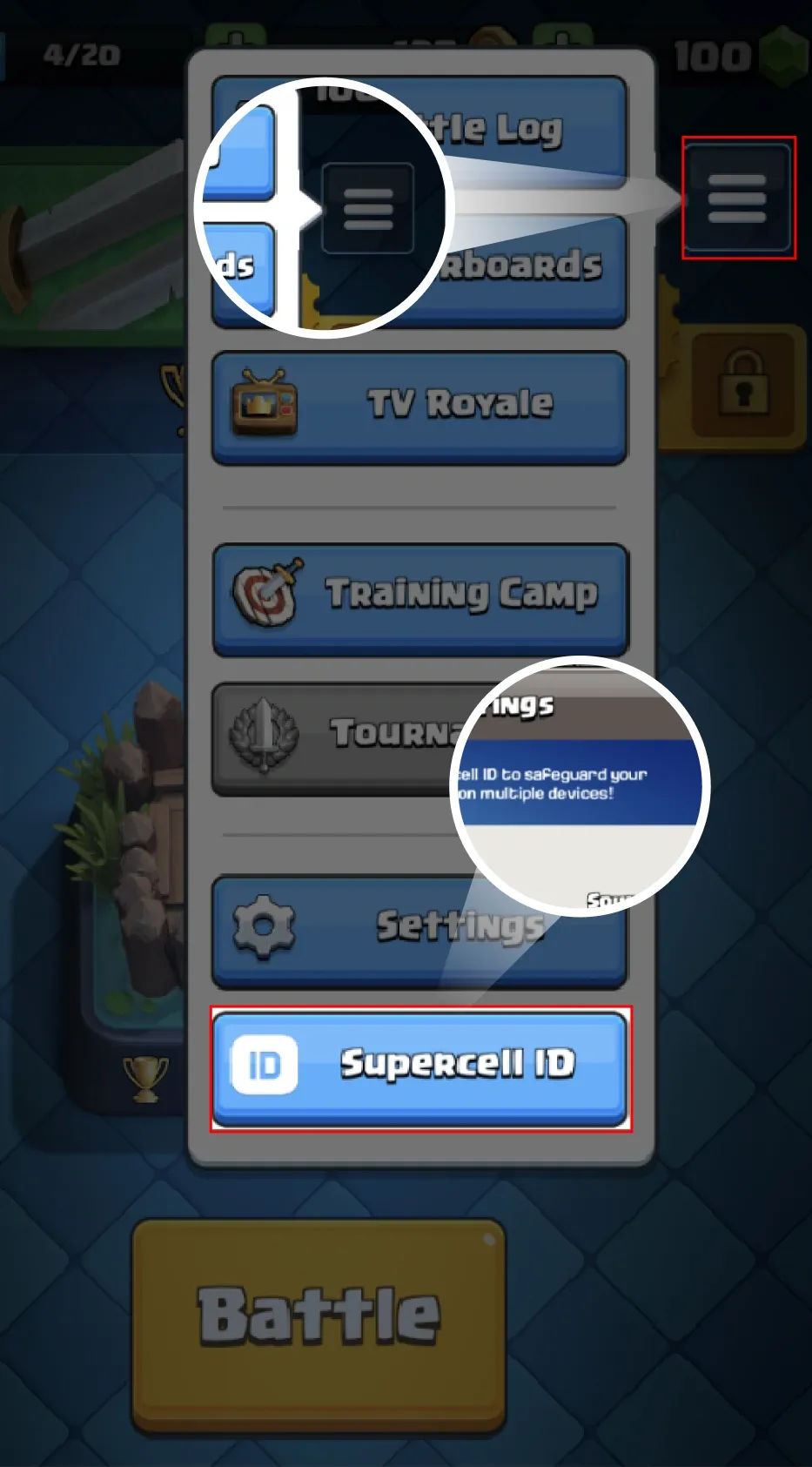
Main screen top-right menu → Supercell ID; the name shown on the account page is the player name
Format
Player name / Player Tag
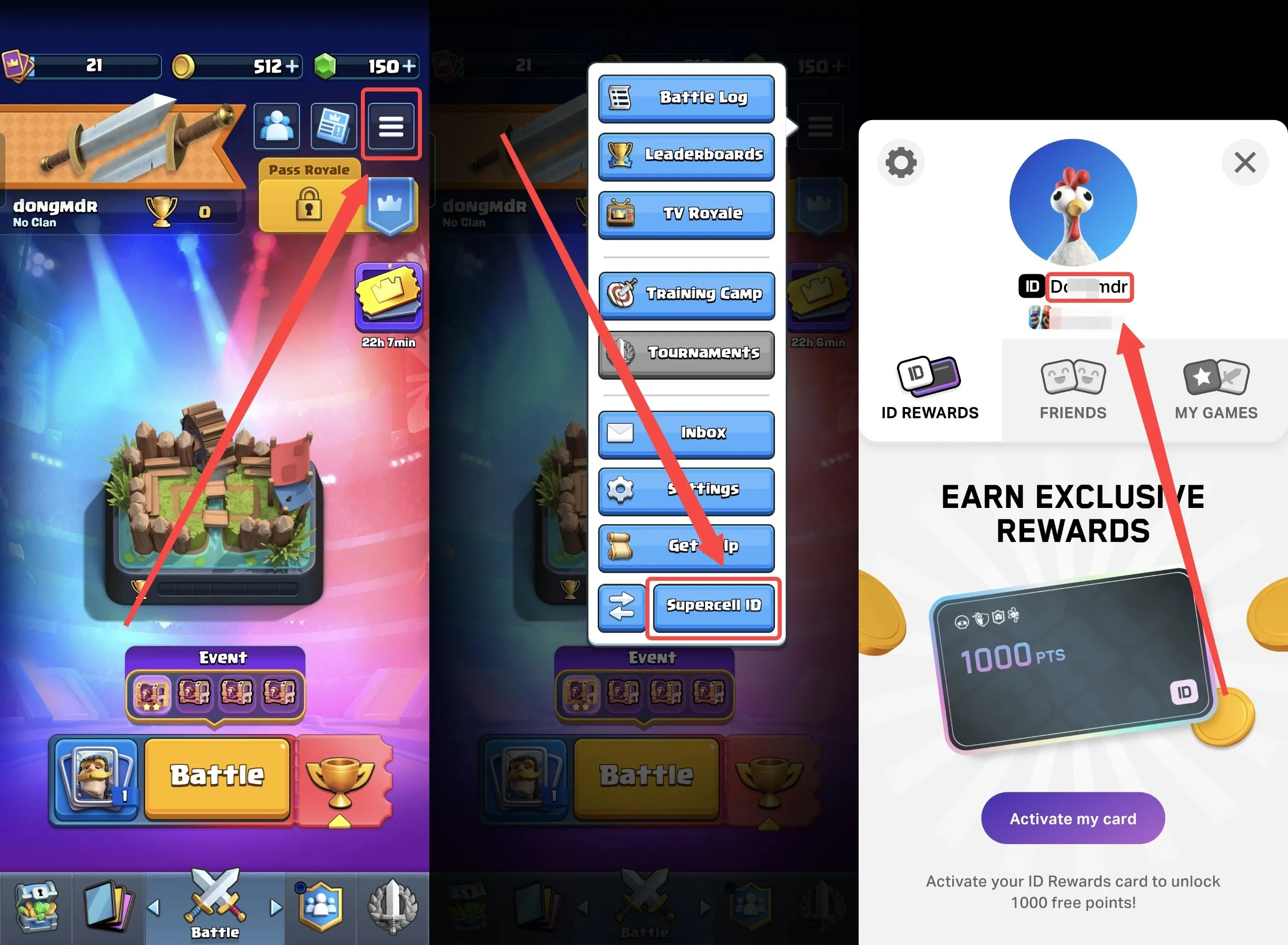
English UI screenshot: menu → Supercell ID → player name
Account linking / login method check
For third-party login, first confirm that an email is linked.
Available logins
Supercell ID
Unavailable
Apple account (link a Supercell ID first, then sign in with the Supercell ID for top-up)
Linking path
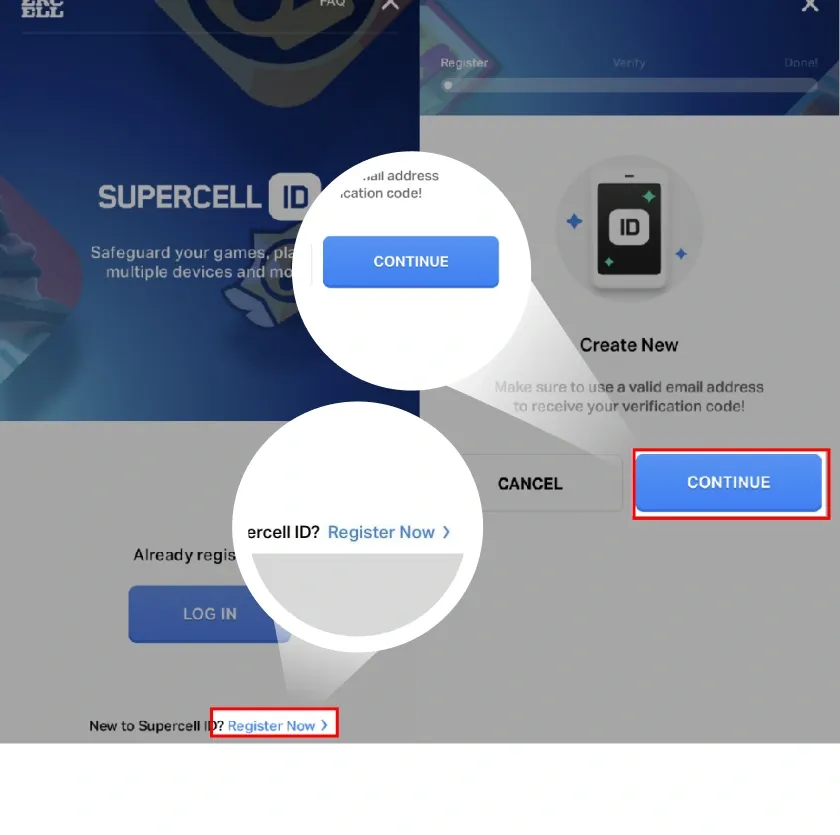
Supercell ID is the official unified ID for the game. Linking it protects your account and lets you play your Supercell games across all mobile devices; complete binding in three steps:
1. Launch the game, go to Settings, and tap "Supercell ID"; on the Supercell ID page tap "Register Now", then "Continue" (if you already have a Supercell ID, you can log in directly)
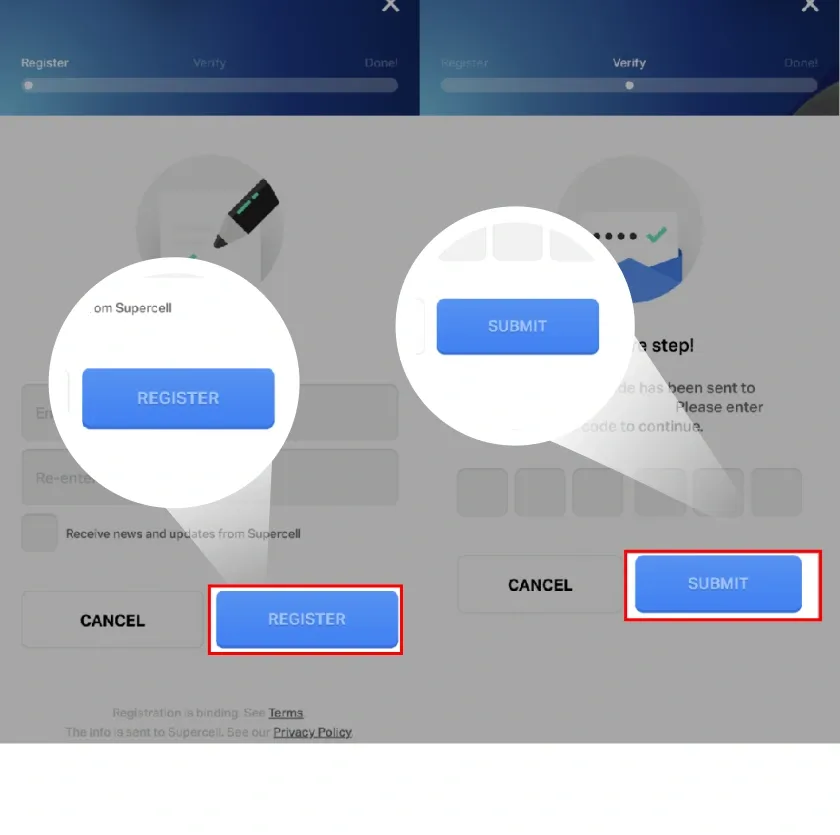
2. Enter a valid email address and tap "Register", receive the 6-digit verification code in your email, enter it and tap "Submit"
3. After registration is complete, you can use that Supercell ID to sign in and top up
Account security
Do
・Only submit information through the Grecharge website, Discord or customer support・Login Top-Up: provide info after payment, and change your password right after completion・Self Top-Up: always clear your login info and exit when done・After delivery, compare with the tier and confirm the quantity matches
Don't
・Do not follow instructions from strangers outside these channels・Do not place the same order repeatedly in a short time・Do not log in to the game yourself during Login Top-Up
Fees, payment and data security
Fees
Priced in local currency, fees extra; the checkout page is final.
Payment methods
Google Pay, Apple Pay, VISA, Mastercard, etc., varying by region; the checkout page is final.
Data security
Login information is used for this order only; it is deleted within 24 hours after completion, and kept for up to 7 days at most for after-sales checks.
Refunds
Not processed: full refund; processing: refund based on progress; delivered: no refund
Scope
We only provide items that already exist in the game and do not modify game values.
2 During|Self Top-Up in 8 steps
After payment, operate inside the cloud gaming window; there is a countdown at the top, so finish the purchase before it ends.
1
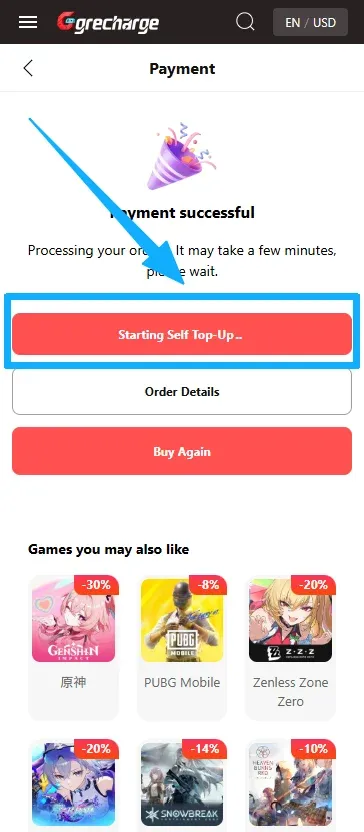
After payment, go to the order page and tap the prompt
After payment, the order page shows "Starting Self Top-Up" and a "Cloud environment is ready" notice; tap"Start Self Top-Up (Top Up Now)"to enter the cloud game.
2
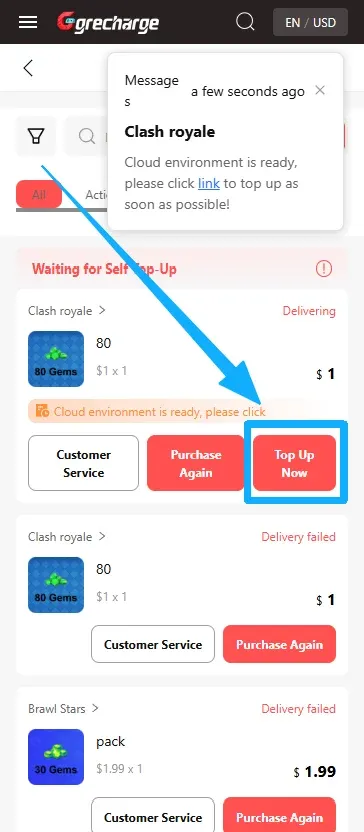
Exited by accident? You can restart
If you exit by accident, go to the Order Center, find that order, and tap「Top Up Now」 on the right of the yellow notice bar to restart self top-up.
3
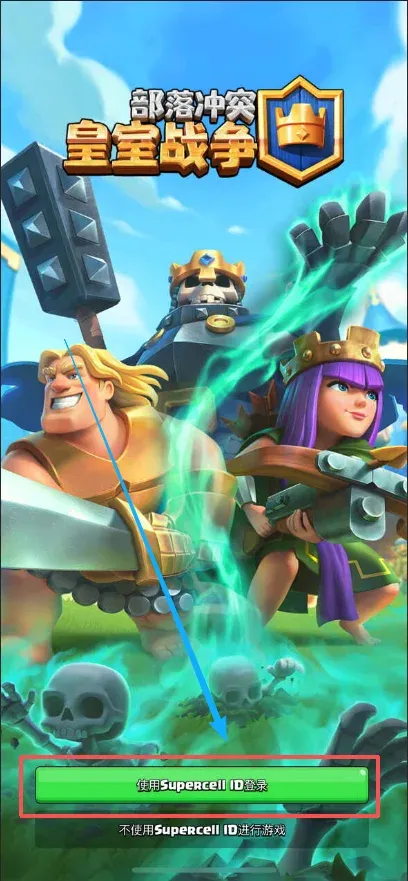
Enter the game and tap Supercell ID to sign in
Enter the game interface and tap"Sign in with Supercell ID". Note: Apple accounts are not supported for top-up yet; if you only have an Apple account, link a Supercell ID first and sign in with that instead.
4
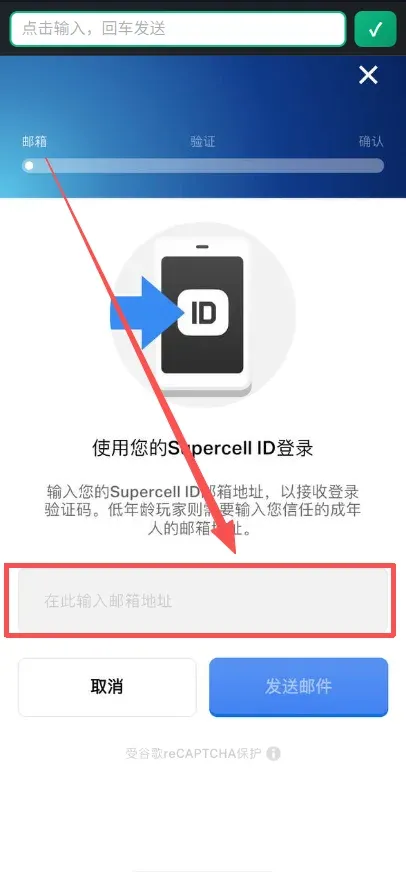
Sign in to your Supercell ID account
Enter your Supercell ID email address and tap"Send email", then complete sign-in with the verification code you received.
5
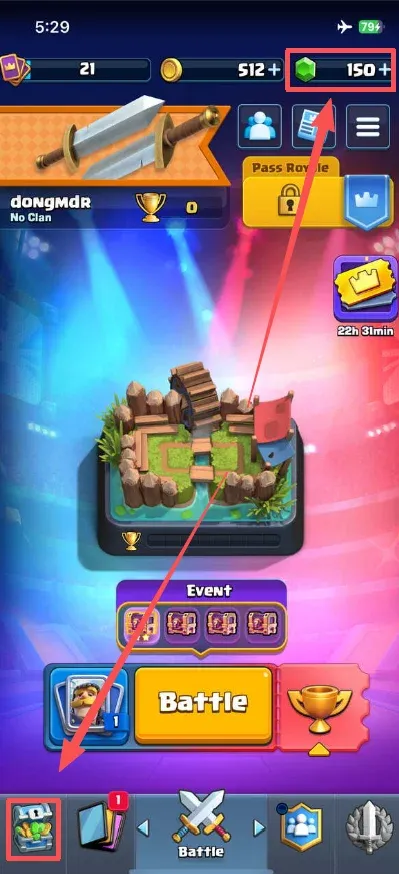
Tap the shop in the top right
Back on the main game screen, you can taptop rightbuy Gems directly, or tapbottom leftto buy the pack.
6
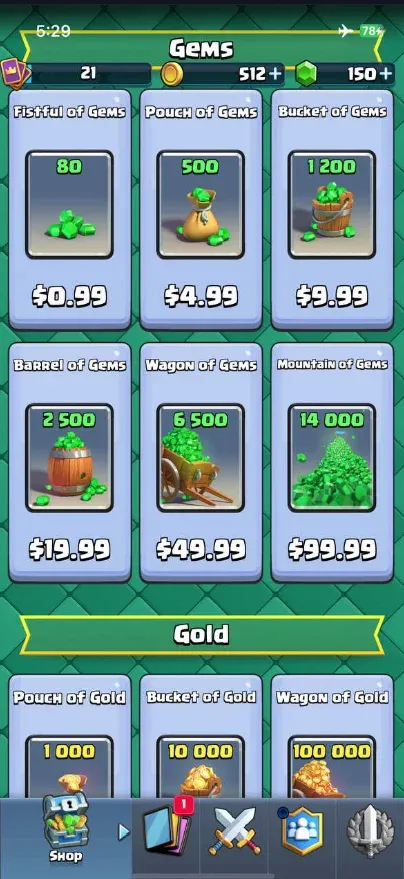
Tap the item you ordered
Find the item you ordered in the shop and tap it.Only the item you ordered can be purchased; tapping any other item will fail.
7
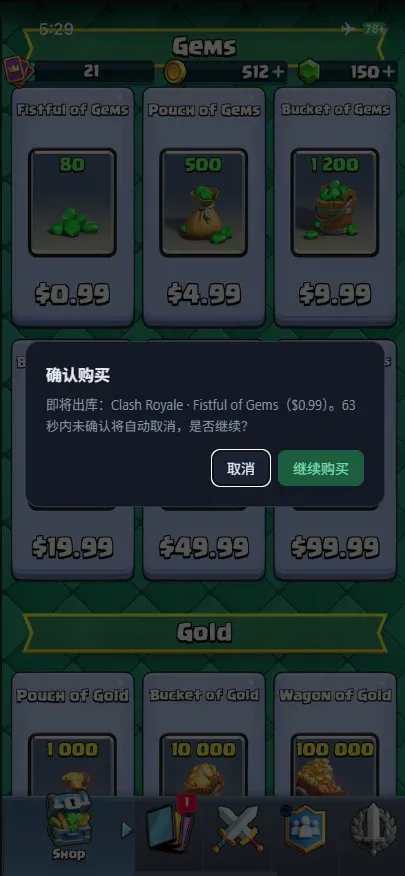
Tap and confirm purchase
Check the item and price in the Confirm Purchase window and tap"Continue"; the window has a countdown, please finish before it ends.
8
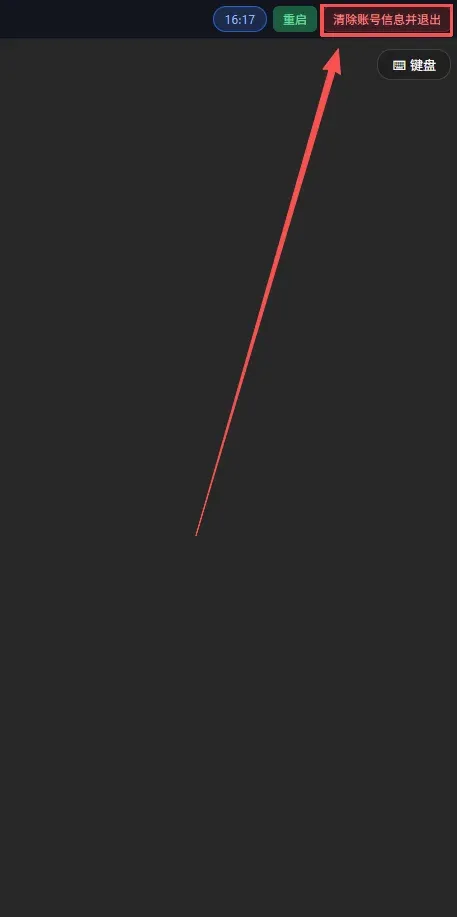
After confirming receipt, tap exit in the top right
After checking your rewards in-game and confirming the amount matches,tap "Clear account info and exit" in the top right; the cloud environment is cleared automatically and no login record is kept.
Note: only buy the specified product.Only buy the product you paid for; if you tap the wrong one, cancel first and choose the correct one.
Peace of mind:After the purchase is done and you finish, the cloud environment is cleared automatically and leaves no game login record.
Countdown timed out?If you don't enter the game before the countdown ends, the order may need to be resubmitted. Find the order in "Order Center" to continue, or contact support.
2 During|Login Top-Up (support buys) in 4 steps
The step that takes the most time is confirming that your info and pack are correct, so don't skip any step.
1
Choose a product and pay
Open the product page, choose a tier, check the amount and pay.
2
Provide login info
After payment, as support notifies you, provide Game account & password, UID and a screenshot of the pack to top up; keep your inbox reachable meanwhile.
3
Wait for manual top-up
After payment, follow the customer service notification,provide the verification codeto our staff, who will sign in and complete the purchase; during this time pleasedo not log in to the gameto avoid login conflicts.
4
Log in and confirm delivery
After the completion notice, log in, check that the contents match the screenshot, andchange your password right away。
Estimated delivery time
Orders accepted 24 hours a day; support speed varies by time of day.
Method
Typical delivery
Description
Self Top-Up
Usually 5–10 minutes
During redemption, do not close the interface or log in from another location; during events, time depends on order volume, so top up early
Login Top-Up
30–60 minutes
Support logs in and buys; do not log in to the game meanwhile
Late night and event launch days may have longer queues; we suggest ordering early.
3 After|Confirm delivery; contact us if there's a problem
One last step after payment: confirmation and after-sales.
After delivery: check what you bought
Self Top-Up
After the in-game purchase, check the Rewards window plus in-game mail and bag to confirm the quantity matches what you wanted, and remember to tap "Clear account info and exit".
Login Top-Up
After support notifies you of completion, log in to the game to confirm the quantity and change your password right away.
What if the UID is wrong?
Wrong entry
Result and handling
Wrong UID but it matches a valid account
The product will be topped up to someone else's account; it usually cannot be recovered or refunded
Entered your own alt account
The product will be topped up to the alt account, not your main account
Invalid UID (account not found)
Top-up usually cannot be completed; please check the UID and reorder, or ask support for help
If you've already entered it wrong:Contact support immediately and provide the order number, transaction time and the UID you entered.
Haven't received it?
Self Top-Up
Go to "Profile → Order History" to relaunch Self Top-Up; if there's still a problem, contact Grecharge support with your order number.
Login Top-Up
First try restarting the game; if it hasn't arrived after 60 minutes, contact support with your order number to check the order. Support will confirm progress or resend.
Why is an order delayed?
Possible reasons
Description
Account info entered incorrectly
The account, password or UID entered when ordering is wrong, so support cannot log in or the product is sent to the wrong place; please double-check
Login issue
A verification code or a different-location login check is needed; provide it as support notifies you. A different-location login notice during support login is normal
High order volume during events
During events, processing time depends on order volume; we suggest topping up early
FAQ
Can I log in during Login Top-Up?
Do not log in to the game during Login Top-Up, to avoid conflicting with support's login and interrupting the order; with Self Top-Up you do it yourself.
Do I need to provide a password?
Not needed for self top-up. For login top-up it is entered when ordering; Supercell ID signs in with an email verification code, the data is used only for this order and deleted within 24 hours.
Why are prices different?
Prices differ depending on the top-up method.
Ready? Place your order
Pick a product, pay, and follow the steps; contact support anytime if you run into problems.
Back to top to choose a tier
Having problems?




 Self Top-Up
 4%