



 Coins
 35%
5000
$0.58
-$0.07
$0.65
35%
7000
$0.79
-$0.60
$1.39
35%
10000
$1.14
-$0.65
$1.79
35%
20000
$2.27
-$1.27
$3.54
35%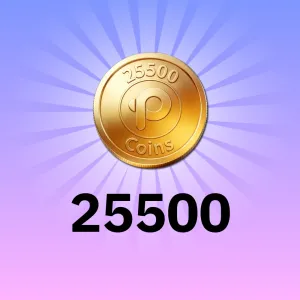
25500
$2.87
-$1.61
$4.48
35%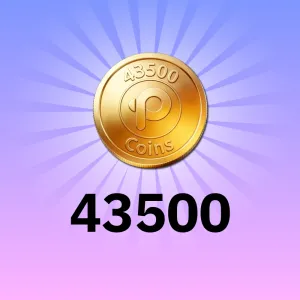
43500
$4.9
-$2.75
$7.65
35%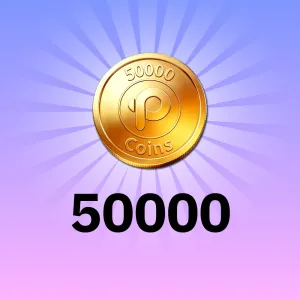
50000
$5.67
-$3.18
$8.85
35%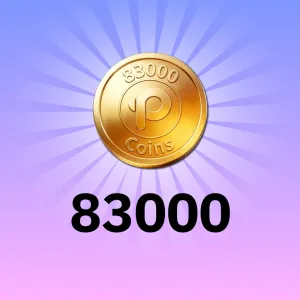
83000
$9.32
-$5.22
$14.54
35%
100000
$11.34
-$6.36
$17.7
35%
180000
$20.24
-$11.32
$31.56
35%
252000
$28.3
-$15.84
$44.14
35%
270000
$30.34
-$16.97
$47.31
35%
430000
$48.29
-$27.02
$75.31
35%
450000
$50.55
-$28.29
$78.84
35%
870000
$97.71
-$54.66
$152.37
35%
1780000
$199.17
-$112.56
$311.73
35%
4450000
$499.75
-$279.59
$779.34
35%
8900000
$999.5
-$559.15
$1558.65
မင်းလိုချင်တဲ့ ဂိမ်းလက်ဆောင် pack မရှိဘူးလား။
ကုန်ပစ္စည်းအကြောင်းအရာ

What are Poppo Live coins?
Know what coins are for first, then decide how many to buy.
How do I buy coins?
Just pick a coin amount in the product section above — 18 packages from 5,000 to 8,900,000 coins.
Top up for yourself
Most common
•Enter the Poppo ID shown on your own “Me” page; the coins go to your own wallet
•After delivery, check your coin balance on the “Me” page under Coins
•No account password and no login verification code needed
Top up for a friend
Coins go to their account
•Ask your friend to copy their Poppo ID from the “Me” page and send it to you, then order with their ID
•The coins go to your friend’s wallet, and they send gifts themselves
•Want to send gifts to a host yourself? Enter your own ID — not the host’s ID
Before you order
Please check these points before placing an order.
Confirm your Poppo ID first
The most important step
•If the Poppo ID is wrong, the coins go to someone else’s account and cannot be transferred or refunded
•Use the in-app “Copy” button instead of typing it; nicknames can be duplicated, so always go by the numeric ID
Coins can’t be transferred
Think it through before topping up
•Once credited, coins cannot be transferred and stay in that Poppo ID’s account
•Coins (for sending gifts) and Points (earned by hosts from gifts) are two separate balances and cannot be exchanged
•Usage rules are subject to Poppo Live’s official terms
Coin price list
Reference prices in US dollar below; the amount shown at checkout is final. Fees may differ by payment method, so please confirm the currency and total before paying.
Lowest per 1,000 coins, approx.
$0.112 / 1,000 coins
Based on the 1,780,000-coin package (reference price ÷ coins × 1,000). Every package of 10,000 coins or more falls between $0.112 and $0.114; the checkout amount is final.
How many coins do I need?
Subtract the coins you already have and only top up the difference. Work it out in three steps.
1
Check the gift price
In a live stream, tap the gift icon to see how many coins the gift you want costs
2
Check your balance
Open the app and tap “Me” at the bottom right — the number on the “Coins” card is your current coin balance
3
Pick a package for the gap
Subtract your balance from the gift price and choose a package that covers the difference
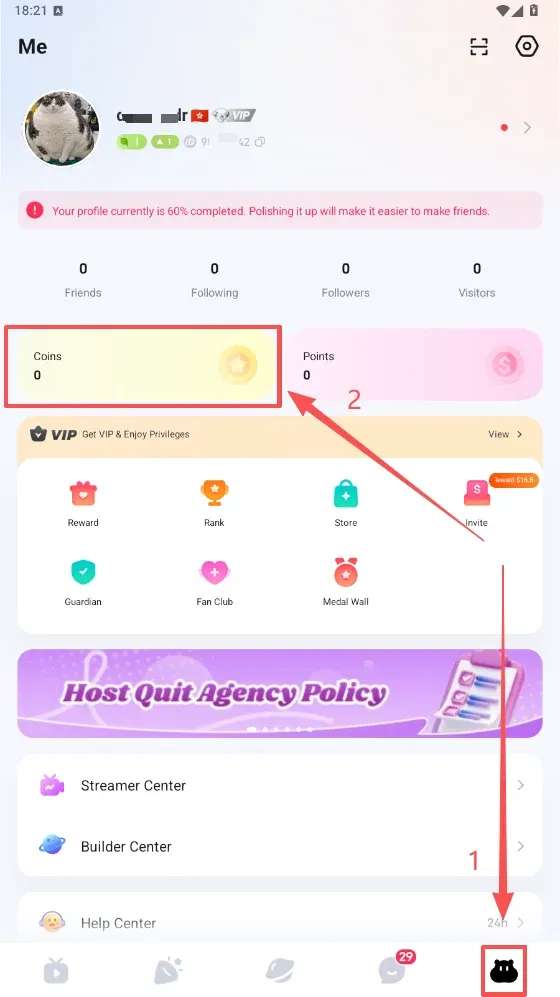
Image: ① Tap “Me” at the bottom right ② The number on the “Coins” card is your current coin balance
Example: The gift you want costs 30,000 coins and your wallet already has 10,000, so you only need 20,000 more — the 20,000-coin package is enough.
Ordering during events
When Poppo Live runs top-up events, PK or host events, read the official rules and event period first. To take part, make sure your top-up is completed within the event period.
Can’t find the coin amount you want?Contact customer support and tell us the coin amount you need.
ငွေဖြည့်လုပ်ငန်းစဉ်
Three stages: before, during and after purchase.
Before purchase: have your Poppo ID ready
Reminder: Enter the numeric ID, not the nickname — nicknames can be duplicated and cannot identify an account.
Where is my Poppo ID? Find it in 3 steps
1
Open Poppo Live
Log in to the account you want to top up
2
Tap “Me” at the bottom right
Go to your profile page
3
Copy your Poppo ID
The number after the ID icon, to the right of your avatar and below your nickname, is your Poppo ID (UID). Tap the copy icon next to it and paste it into the order field
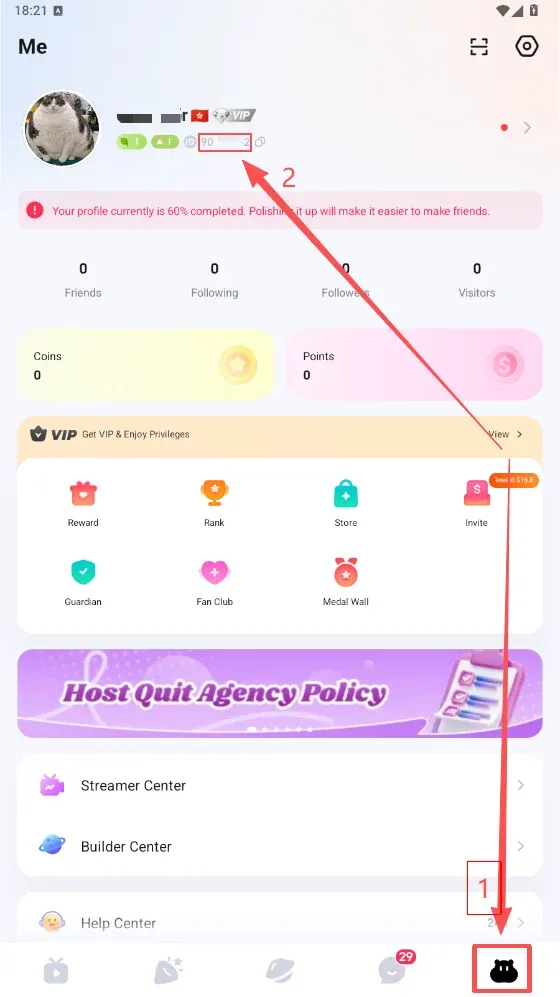
Image 1: ① Tap “Me” at the bottom right ② The number after the ID icon below your nickname is your Poppo ID (UID), with a copy icon next to it
Reminder: Copy and double-check your Poppo ID, then paste it into the order.
Account safety
Do
•Order only through the Grecharge website or official customer support
•Check your Poppo ID with copy & paste before ordering
Don’t
•Never send your password or verification code to anyone
•Customer support will never ask for your Poppo Live password or login verification code
•Ignore strangers who ask for your login details in the name of a “top-up”
During purchase: order and pay
1
Choose a coin amount
Pick a package on the product page
2
Enter your Poppo ID
Paste the ID you just copied and check it once more
3
Choose a payment method and pay
Fees may differ by payment method, so confirm the currency and total before paying. With credit card, Google Pay or Apple Pay, a window pops up after payment — enter your email and click the verification link in your inbox to finish
4
Wait for delivery
After payment succeeds (and email verification is done, for methods that require it), coins usually arrive within 1–5 minutes
Want to track your order?View orders
Delivery time
After purchase: check and follow up
Check after delivery
Reopen the Poppo Live app, tap “Me” at the bottom right, and make sure the coin balance on the “Coins” card matches your order.
Image: ① Tap “Me” at the bottom right ② The number on the “Coins” card is your coin balance — compare it with the coins in your order
Having a problem? Find your case first
Before contacting support, please have: your order number, payment time and the Poppo ID you entered.
ဂိမ်းအကြောင်း
About Poppo Live
Poppo Live is a live-streaming social platform where you can watch streams, send gifts and chat in party rooms. This section is just a short intro to the platform; for top-up details, see the product description above.
You may also need
Grecharge also offers top-ups for other popular live-streaming platforms — tap a card below to go there.
Grecharge ကို ဘာကြောင့်ရွေးချယ်သင့်သလဲ။

ကိုယ်ရေးကိုယ်တာ ကုဒ်ဝှက်ခြင်း၊ စိတ်ပူစရာမလိုသော အကောင့်
သင်၏ဝင်ရောက်မှုအချက်အလက်ကို တင်းကြပ်စွာကာကွယ်ရန် ဘဏ်အဆင့်ဒေတာကုဒ်ဝှက်နည်းပညာကို အသုံးပြုပါ။

လျှပ်စီးကြောင်းအားပြန်သွင်းခြင်း၊ ချက်ချင်းငွေပေးချေခြင်း။
အော်ဒါမှာယူပြီးနောက် ပျမ်းမျှ 3-5 မိနစ်အတွင်း အလွန်မြန်ဆန်သော အားပြန်သွင်းမှုအတွေ့အကြုံကို ပေးပါသည်။

24/7၊ ဖုန်းခေါ်ဆိုမှုတွင် အားပြန်သွင်းပါ။
အလိုအလျောက်လုပ်ဆောင်ခြင်းစနစ်နှင့် လက်စွဲဖောက်သည်ဝန်ဆောင်မှုများသည် သင်၏အရေးပေါ်လိုအပ်ချက်များကို အချိန်မရွေးဖြေရှင်းရန် တစ်နေ့လျှင် 24 နာရီ အွန်လိုင်းဖြစ်သည်။

Guanzhong အရည်အသွေး၊ နှုတ်ထွက်သက်သေ
အနက်ရောင်ကတ်များ၏ အန္တရာယ်ကို နှုတ်ဆက်လိုက်ပါ၊ ကျွန်ုပ်တို့သည် 100% ပုံမှန်အဖြူကတ်ငွေပြန်သွင်းခြင်းကို အခိုင်အမာတောင်းဆိုပြီး လုပ်ငန်းစဉ်တစ်ခုလုံးသည် ကိုက်ညီပါသည်။


