PUBG Mobile

PUBG Mobile Top Up

5.0
160
5.0
160
0 Sold
Fast
Safe
24/7
Self Top-Up
GlobalGlobal
Only TaiwanOnly Taiwan
Discount5%
60 UC
60 UC
$0.95
-$0.04
$0.99
Discount8%
300+25 UC
300+25 UC
$4.68
-$0.31
$4.99
Discount5%
1500+300 UC
1500+300 UC
$23.41
-$1.58
$24.99
Discount8%
200 Draws Scorpius' Favor
$187.24
-$12.74
$199.98
Discount8%
10 Draws Scarlet Mary
$9.33
-$0.66
$9.99
Discount8%
150 draws Moto Cruise x Lincoln
$118.31
-$6.67
$124.98
Discount5%
18000+6300 UC
18000+6300 UC
$287.29
-$12.68
$299.97
Discount9%
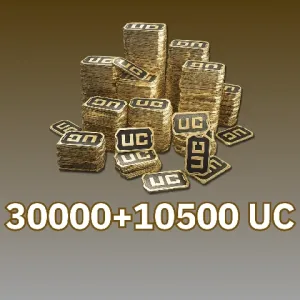
30000+10500 UC
30000+10500 UC
$478.82
-$21.13
$499.95
Discount5%
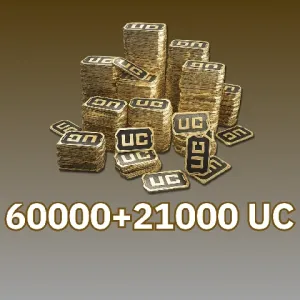
60000+21000 UC
60000+21000 UC
$957.64
-$42.26
$999.9
Discount8%
600+60 UC
600+60 UC
$9.36
-$0.63
$9.99
Discount5%
3000+850 UC
3000+850 UC
$46.81
-$3.18
$49.99
Discount5%
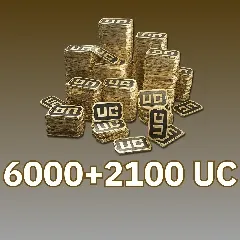
6000+2100 UC
6000+2100 UC
$93.99
-$6.00
$99.99
Discount8%
Bonus Pass (Lv. 1-110)
$14.36
-$0.63
$14.99
Discount8%
Elite Pass (Lv. 1-50)
$5.75
-$0.24
$5.99
Discount10%
Elite Pass (Lv. 1-100)
$10.53
-$1.46
$11.99
Discount10%
Elite Pass Plus (Lv. 1-100)
$25.86
-$4.13
$29.99

Can't find the game package you want?

Product Description

Background
PUBG MOBILE UC Top-Up

PUBG MOBILE UC top-up: enter your UID, credited in 1–5 minutes

Global and Taiwan servers sit on two separate tabs. Every tier lists our price and the official reference price, and the three reference tiers — Most bought, Best value and Worst value — also show the price per UC, from $0.011/UC. All you need is your numeric UID: no account, no password, and we never log in to your game. New season, a draw opening or a Pass going on sale: pick a tier, paste your UID, done.

UID only, no login detailsUsually credited in 1–5 minGlobal and Taiwan server tabsPasses and lucky-draw bundles sold separately
View UC packages
Lowest per UC
$0.011
vs official reference
Save 3–8%
Usual credit time
1–5 min
What you need
Just your UID

How much does PUBG MOBILE UC cost? Prices by server

Check which server your UID belongs to first, then switch with the slider above (drag it or use ← → on desktop, swipe on mobile). Prices are in the currency shown on the page, at the public price before login; coupons may apply once you log in, and the amount at checkout is final.

Server switch
Global server / Taiwan server (Only Taiwan)
⇄ Drag the slider
Page 1/2 · Global server
Taiwan ➜
Global = Global server
Choose this tab for UIDs from North America, Europe, the Middle East, Southeast Asia and other Global servers
9 tiers, from $0.96; not valid for Japan, Korea or Vietnam servers, or for Peacekeeper Elite (China version).
UC price comparison
Savings = (official reference price − our price) ÷ official reference price. Price per UC = price ÷ UC received (bonus included); shown only on the three reference tiers.
UC tier
Our price
Official ref.
You save
60 UCWorst value
$0.96$0.016/UC
$0.99
3%
325 UC300+25
$4.68
$4.99
6%
660 UC600+60
$9.36
$9.99
6%
1,800 UC1,500+300Most bought
$23.41$0.013/UC
$24.99
6%
3,850 UC3,000+850
$46.81
$49.99
6%
8,100 UC6,000+2,100Best value
$92.88$0.011/UC
$99.99
7%
24,300 UC18,000+6,300
$282.67
$299.97
6%
40,500 UC30,000+10,500
$468.12
$499.95
6%
81,000 UC60,000+21,000
$942.20
$999.90
6%
All nine tiers sit on one page, but the price per UC bottoms out at 8,100 UC: 24,300 UC ($0.012), 40,500 UC ($0.012) and 81,000 UC ($0.012) all cost more per UC than 8,100 UC ($0.011). If you need more UC, several 8,100 UC packs work out cheaper.
Page 2/2 · Taiwan server
⬅ Global
Only Taiwan = Taiwan server
Taiwan server UIDs only; tiers and prices differ from Global
6 tiers, from $0.91; not valid for Japan, Korea or Vietnam servers, or for Peacekeeper Elite (China version).
Taiwan and Global UIDs are not interchangeable. Enter a Global UID on the Only Taiwan tab and the system rejects it as a wrong top-up account — the money is not lost, the top-up simply went to the wrong server.How to check: in the game lobby go to Settings → Account. If the login method or region shows Taiwan, choose Only Taiwan; if it shows another region, go back to the Global tab. Prices and tiers differ between the two.
UC price comparison
Savings = (official reference price − our price) ÷ official reference price. Price per UC = price ÷ UC received (bonus included); shown only on the three reference tiers.
UC tier
Our price
Official ref.
You save
63 UC60+3
$0.91
$0.99
8%
191 UC180+11Worst value
$2.81$0.015/UC
$2.99
6%
700 UC600+100
$9.36
$9.99
6%
1,875 UC1,500+375Most bought
$23.40$0.012/UC
$24.99
6%
3,990 UC2,980+1,010
$46.49
$49.99
7%
8,400 UC6,000+2,400Best value
$94.51$0.011/UC
$99.99
5%
The Taiwan server has only 6 tiers, and they differ from Global: the 191 UC tier costs more per UC ($0.015) than 63 UC ($0.014); prices only start falling from 700 UC up, with 8,400 UC ($0.011) the lowest.
How to save the most: look at the price per UC, not the discount percentage. Each tab marks only three tiers — Most bought (the most popular here), Best value (lowest per UC) and Worst value (highest per UC, avoid it) — and shows total prices for the rest. Tabs cannot be mixed: a Global UID cannot buy Taiwan tiers, and vice versa.

Prices taken from our product page on 2026-11-10; official reference prices are compiled from public listings, and the official page prevails.

Which UC tier should you buy? Start with what you need this season

Not sure whether 60 UC is enough, or whether topping up straight to 8,100 UC saves more? Check your use case first, then pick a tier above.

Your situation
Suggested tier (Global server)
Why
Just testing one order or a few hundred UC
60 UC($0.96)
Smallest amount; run through the process once
One 10-pull, or filling a small gap
325 UC($4.68)
About 10% cheaper per UC than the 60 UC tier
Buying the Elite Pass in game
660 UC($9.36)
The dedicated Pass tier (660+60 UC of content) costs $10.40; if you only need UC, this tier saves $1.04
One lucky-draw round, or a full outfit
1,800 UC($23.41)
Our most bought tier; from mid-range up the price per UC drops clearly
X-Suit or top-tier lucky draws
8,100 UC($92.88)
Lowest price per UC of all nine tiers
24,300 UC or more
8,100 UC × 3($278.64)
Saves $4.03 versus buying 24,300 UC directly, for the same amount of UC

In-game Pass prices follow the current season display; the table above only compares tiers and is not in-game pricing.

Passes and lucky-draw bundles: not priced per UC

These are fixed products, not UC amounts: the price covers the item itself and cannot be converted to a price per UC. Pass discounts actually run deeper than on UC tiers (up to 15%), so look here if you want a Pass.

Item
Our price
Official ref.
You save
Elite Pass PLUS (Lv1–100)
$25.53
$29.99
15%
Elite Pass (Lv1–100)
$10.40
$11.99
13%
Crimson Mary 10-Pull Bundle
$9.33
$9.99
7%
200-Pull: Scorpio's Grace
$187.24
$199.98
6%
150-Pull: Cruise × Lincoln
$118.31
$124.98
5%
Royale Pass Lv1–110
$14.17
$14.99
5%
A19 Elite Pass (Lv1–50)
$5.67
$5.99
5%
The Elite Pass (Lv1–100) tier equals 660+60 UC of content ($10.40): 60 UC more than the 660 UC tier ($9.36), for $1.04 extra. If you only need UC, buy the 660 UC tier; choose this one when you actually want the Pass itself. Season content follows the in-game description.

Lucky-draw bundles (10, 150 and 200 pulls) are event products, not permanent tiers: each has its own run time, ending on the date shown on the product page. Pulls expire when the event ends and the tier is taken down, with no late purchase. Buy only when you plan to draw, not to stock up for a small saving.

How to buy: pick your server, pick a tier, paste your UID

PUBG MOBILE UC is a direct UID top-up — UC goes straight to the UID you enter. No account or password, and we never log in to your game.

1Switch to your server tab
Global for the Global server, Only Taiwan for the Taiwan server; the wrong tab means a failed top-up
2Pick a tier, paste your UID
Paste your numeric UID and check it once more before submitting
3Credited automatically after payment
Sent automatically by the system, usually credited in 1–5 minutes
What you need
Just your PUBG MOBILE UID (numeric, e.g. 5123456789); no account, password or verification code
Supported platforms
Android / iOS; Global and Taiwan servers. Japan, Korea and Vietnam servers and Peacekeeper Elite (China version) are not supported

When to order: buy now or wait

Buy now if
A new season Pass goes on sale, a limited draw is in its last days, or you want a new X-Suit — that is when you need the UC right away.
You can wait5% coupon
If you are only stocking up with nothing specific in mind, join Grecharge Discord first and grab a 5% coupon before you order — same UC, lower price.
Join Discord for a 5% coupon
Season launch and updates
On the first day of a Royale Pass season, during major updates and official maintenance, orders pile up and may take 10–20 minutes longer. If an event deadline is close, order a day early instead of in the last hour.

Cost, refunds and risks: read before you pay

Once UC reaches a character it cannot be recalled. Check these four points before paying.

Cost
The price shown is the public product-page price; coupons may apply after login, and the amount at checkout is final
Currency
Charged in the currency shown on the page; any cross-border fee or exchange-rate difference is charged by your card issuer or payment provider
Wrong UID
UC goes to the character of that UID and cannot be recalled; no refund in this case. Check every digit of the UID and the server tab before paying
Not credited
Fully close the game and log in again first. If nothing arrives after 30 minutes, contact support with your order number using the button at the bottom right
Check three things before paying: server tab, tier and UID. Get any one wrong and the UC may land in another account, with no way to recover it.
Pick your server and tier, and you are ready to order
See "How it works" for the full steps.
Back to top to pick a UC package
This platform is an independently operated store for virtual goods and top-up services. It is not the official operator of, or a partner to, PUBG MOBILE, KRAFTON, Level Infinite or LIGHTSPEED STUDIOS; game names, trademarks and icons belong to their respective owners. Products sold include third-party top-up services. The "official reference price" is compiled from public information for comparison only and may change with official adjustments.


Top-Up Process

What to prepare before ordering

PUBG MOBILE uses direct UID top-up, so you only need three things. No account or password, and no screenshots.

PUBG MOBILE UID
Your in-game Character ID (numeric, e.g. 5123456789), which you can copy straight from your profile page
Your server
Global server or Taiwan server (Only Taiwan); it must match the server your UID belongs to
The tier you want
A UC amount, or a fixed item such as a Pass or lucky-draw bundle
No account, password or verification code, and no login to your game. The only thing you have to do is make sure the UID and server are correct.

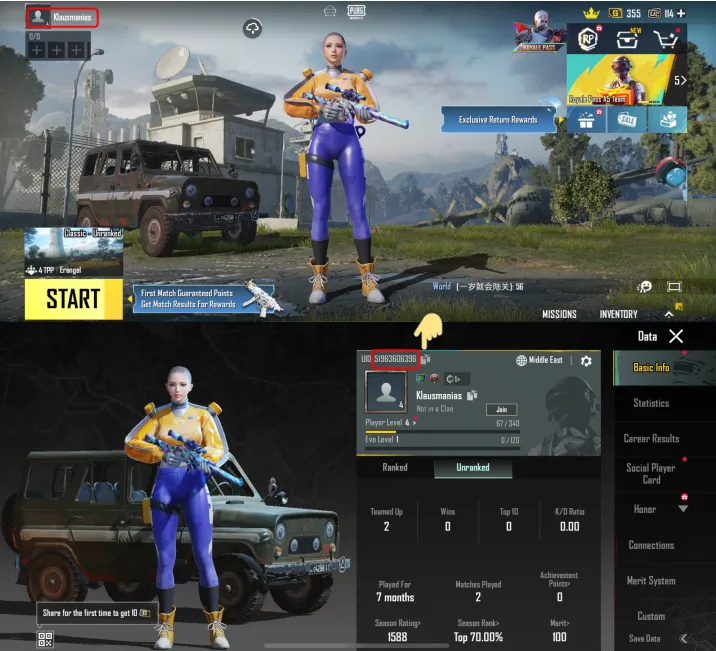
Where is your UID? Three steps

Log in → tap the avatar top left → the numeric string under your name on the profile page.

1Log in to the game
Enter the PUBG MOBILE lobby with your usual account (the same on Android and iOS)
2Tap the avatar top left
Open your profile and look at the line under your name
3Copy your UID
The all-digit string is your Character ID; long-press to copy it
Where to find your PUBG MOBILE UID: tap the avatar in the top-left corner to open your profile; the digits below your name are the UID

The number in the red box is your UID (illustrative image)

Do not pick up spaces when copying; if you type it by hand, check every digit — one wrong digit sends the UC to someone else's account.

Check which server you are on

PUBG MOBILE is run separately by region; the wrong tab means the top-up fails.

Your account
belongs to
Which tab
Top-up available
Global server
North America, Europe, Middle East, Southeast Asia and more (outside Japan, Korea and Vietnam)
Global
Available
Taiwan server
Client downloaded in Taiwan
Only Taiwan
Available
Japan / Korea standalone servers
Servers operated locally in Japan and Korea
—
Not supported
Vietnam server, Peacekeeper Elite
Vietnamese servers, mainland China version
—
Not supported
The most common failure is not payment, but a UID sent to the wrong server. If the UID is Global and you order on the Only Taiwan tab, the system flags a wrong top-up account and refunds — no money lost, but one wasted wait.How to check: look at which region's store your client came from, the currency used in the in-game shop, and whether there are Taiwan-only events. If you are still unsure, ask support instead of gambling on an order.

Six steps to order

The slowest part is making sure the UID and server are right, so do not skip any step.

1Log in, set language and currency
Log in to Grecharge and check the currency shown
2Find PUBG MOBILE
Use the top-up field on the home page or search for PUBG MOBILE
3Paste your UID
Enter your PUBG MOBILE UID and check every digit before submitting
4Choose server and tier
Global or Only Taiwan, then a UC amount or a fixed item
5Pay
Use the method shown at checkout; track progress in your orders afterwards
6Check in game
After the completion notice, fully close the game, log in again and check the UC balance top right
Want to track your order?View order

How long does it take? Depends on the case

Direct UID top-ups are sent automatically and usually complete in 1–5 minutes.

Case
Typical wait
What you can do
UID and server correct
1–5 minutes
Nothing to do; log back into the game to see it
Payment confirmation is slow
Wait a little
Some payment methods wait for the provider to confirm
Season launch, update or maintenance
10–20 minutes
Orders pile up. Do not order twice just because it is slow
UID or server mismatch
On hold
Reply to support with the correct UID as soon as you see the message

Account safety: what to do and what not to do

Direct UID top-up never touches your login details. Keep two rules: right UID, data to yourself.

Do
· Enter your UID only on the Grecharge order page
· Copy the UID from inside the game and check every digit after pasting
· Confirm the server tab before picking a tier
· Keep your order number and leave the order page open until it is credited
Do not
· Never give your account, password or verification code to anyone — official top-ups do not need them, and anyone asking is a scammer
· Do not trust off-site messages offering extra UC for your password
· Do not place a second order just because it is slow
· Do not use a UID from a friend's screenshot without confirming it with them first

What happens if the UID or server is wrong?

Three cases, by how fixable they are.

Mistake
Result
Fixable
Typo in the UID (and that UID exists)
UC goes to someone else's account; cannot be recalled, no refund
Usually not
UID does not exist
The system cannot send it; order on hold
Can be fixedReply to support with the correct UID
Wrong server tab
Tab does not match the UID; top-up fails or stalls
Can be amendedContact support
Already got it wrong: contact support immediately with your order number, transaction time and the UID you entered — the sooner you act, the better the chance of stopping it.

Payment times and speed

You can order around the clock; the system handles it automatically.

Normal hours
Sent automatically after payment; usually credited in 1–5 minutes
Season launch / update / maintenance
Orders pile up and may take 10–20 minutes longer than usual; order early if an event deadline is close
Over 30 minutes
Fully close the game and log in again first, and check that you are on the character with that UID. Still nothing? Contact support with a screenshot of the order and of your in-game profile (showing the ID and UC balance)
Pick a tier, enter the right UID, and we will handle the rest
Just enter your UID at checkout, pick the right server and pay.
Back to top to pick a UC package
Delivery times are typical only and depend on the payment provider and the official servers; payment methods are those shown at checkout. UC cannot be refunded once the top-up is complete.


About the game

Overview

Item
Details
Developer
Co-developed by LIGHTSPEED STUDIOS and PUBG STUDIOS
Genre
Mobile battle royale shooter, up to 100 players per match
Platforms
iOS / Android, free to download
Release
19 March 2018
Paid currency
UC(Unknown Cash)
Main modes
Classic battle royale (solo / duo / squads of up to four) and seasonal Pass modes

Core loop: drop, loot, rotate, fight, survive

Every match follows the same line; the difference is what you trade off.

Phase
What to do
Key call
Drop
Pick a landing spot
Hot drops have more loot but more players; beginners should start at the edges
Loot
Grab weapons, armor and supplies
Get one primary weapon and armor first; do not overfill your backpack
Rotate
Move with the shrinking safe zone
Enter the zone early and use vehicles and cover
Fight
Engage, ambush or avoid
With few players left you do not have to take every fight; surviving is what scores
Final circle
The last few players fight for the win
Hold high ground and cover, and let the enemy show first

What is UC for?

UC is PUBG MOBILE's paid currency and is mostly spent on the five categories below.

Use
What you get
When you need it most
Elite Royale Pass
A full season of outfits, missions and rewards; the earlier you buy, the more you collect
At the start of a new season
Outfits and sets
Character outfits, sets and avatar frames
When you want a new look or a screenshot
Weapon skins
Gun skins and kill effects
When you want a different feel for your main gun
Lucky draws (Lucky Spin / Crate)
Limited outfits, X-Suit and other top prizes
When limited events launch or return
Emotes and animations
Emotes, dances and drop animations
When you want to interact with others

Item names and prices follow the in-game store display and may change with official updates.

Suggested spending order: first what lasts the season (the Pass), then what you see every day (skins for your main guns, outfits), and only last the draws that depend on luck.
Now pick a tier
Prices and price per UC for both servers are in the product overview.
Back to top to pick a UC package
Game information is compiled from public sources; rules and values may change with official updates, and in-game announcements prevail. PUBG MOBILE names and trademarks belong to KRAFTON, Level Infinite and their respective owners.


FAQ

Absolutely safe and 100% legitimate. All UC purchased through this platform is delivered directly through official PUBG MOBILE channels or authorized interfaces, exactly the same as topping up in the game. We strictly prohibit black-market cards, refund fraud, account abuse, exploits and other unauthorized methods.

Why Choose Grecharge?

icon

Encrypted data, protected accounts

We use bank-level data encryption to protect your login information.

icon

Lightning-fast top-up, instant delivery

Enjoy fast top-ups, delivered in an average of 3-5 minutes after you place your order.

icon

24/7, top up whenever you need

Our automated processing system and customer support are available 24 hours a day to help whenever you need us.

icon

Official top-up quality, trusted by players

We use 100% legitimate payment sources for top-ups and follow applicable rules to protect you from the risks of stolen-card payments.

Copyright ©Hong Kong RADIATION ENTERTAINMENT CO., LIMITED
All rights reserved