Last War:Survival

Last War:Survival Top Up

5.0
0
5.0
0
0 Sold
Fast
Safe
24/7
Self Top-Up

Self Top-Up is now available! We recommend using Self Top-Up for payment.

Self Top-Up is now available! We recommend using Self Top-Up for payment.

Self Top-Up
Login Top-Up
Self Top-UpSelf Top-Up
Discount20%
1.99 Standard Packs
1.99 Standard Packs
$1.59
-$0.40
$1.99
Discount20%
2.99 Standard Packs
2.99 Standard Packs
$2.39
-$0.60
$2.99
Discount20%
3.99 Standard Packs
3.99 Standard Packs
$3.18
-$0.81
$3.99
Discount20%
4.99 Standard Packs
4.99 Standard Packs
$4
-$0.99
$4.99
Discount20%
9.99 Standard Packs
9.99 Standard Packs
$7.98
-$2.01
$9.99
Discount20%
19.99 Standard Packs
$15.97
-$4.02
$19.99
Discount20%
49.99 Standard Packs
$39.93
-$10.06
$49.99
Discount20%
99.99 Standard Packs
$79.86
-$20.13
$99.99
Discount20%
5000 Gold Bricks
5000 Gold Bricks
$39.93
-$10.06
$49.99
Discount20%
10000 Gold Bricks
10000 Gold Bricks
$79.86
-$20.13
$99.99
Discount20%
Season Deluxe Battle Pass
$15.97
-$4.02
$19.99
Discount20%
Dawn Fund
Dawn Fund
$15.97
-$4.02
$19.99
Discount20%
ALL Weekly Pass
ALL Weekly Pass
$15.97
-$4.02
$19.99
Discount20%
Super Monthly Pass
Super Monthly Pass
$19.97
-$5.02
$24.99

Can't find the game package you want?

Product Description

Last War: Survival key art: a post-apocalyptic city base with military vehicles under a dusk sky
LAST WAR: SURVIVAL · Login Top-Up

Want Gold and Diamonds?

Support logs in for you — you just pay

Choose "Login Top-Up": enter your login method, game account, password and UID when ordering; after payment, support logs in and buys Diamonds and packs for you.

💎 Works for Diamonds and packs🔑 Support logs in and buys for you🛡️ Logged out and login records cleared when done
Choose a tier to top up

Servers and login methods we support

Before ordering, make sure your Last War: Survival account meets these requirements.

Supported platforms
Mobile app (iOS/Android)
Supported servers
Global server
Supported login methods
Last War ID、Google

Information required for Login Top-Up

Enter the items below when filling in your order; after payment, support will only ask you for the login verification code.

Game account
Your Last War: Survival account & password / verification code, entered along with your order details.
User ID
Your Last War: Survival UID, entered when you order.
Verification code
Support may need a verification code when logging in. After payment, keep your inbox reachable and provide it when support notifies you; this is the only item collected separately.
Pack screenshot
A screenshot of the pack you want to top up (the in-game shop screen), given to support after payment to verify the tier.
Tip:We suggest linking a loginable account in the game before ordering for more stable login; see "How to buy" below for how to link.

Top-up notes

Please read these points before ordering.

Ordering and delivery time

・Choose the product with the same face value as in the game, and check the server and UID・Do not log in to the game during Login Top-Up to avoid conflicts・Regular orders usually finish in about 5–30 minutes, regardless of what you buy・During events, time depends on order volume; we suggest topping up early

Account and security

・Only submit information through the Grecharge website, Discord or customer support; do not follow instructions from strangers outside these channels・After completion, we suggest changing your password right away to keep your account safe・Login information is deleted within 24 hours after the order is completed

Gold & Diamonds Prices

Priced in local currency; fees extra. The price on the right is the official price; the final amount is as shown at checkout.

Diamonds

Tier
Our price
Official price
500 + 100 Diamonds
$3.48
$6.19
2000 Diamonds
$13.21
$19.97
5000 Diamonds
$33.02
$49.91
10000 Diamonds
$66.02
$99.84

Standard Pack

Tier
Our price
Official price
$4.99 Standard Pack
$3.48
$5.00
$9.99 Standard Pack
$7.69
$9.99
$14.99 Standard Pack
$9.63
$14.98
$19.99 Standard PackMost popular
$15.99
$19.97
$49.99 Standard Pack
$40.99
$49.91
$99.99 Standard Pack
$81.99
$99.84

Weekly & Monthly Cards

Tier
Our price
Official price
Weekly Card (Diamonds)
$3.48
$5.00
Weekly Card (Gold)
$3.48
$5.00
Weekly Card (Food)
$3.48
$5.00
Weekly Card (Iron)
$3.48
$5.00
Weekly Card (EXP)
$3.48
$5.00
Weekly Card Bundle
$15.99
$19.97
Super Monthly Card
$17.99
$24.96

Featured Pack

Tier
Our price
Official price
Daily Deal Pack
$3.69
$5.00
Dawn Fund
$15.99
$19.97
All-in-One Pack
$149.99
$184.67

Not sure which tier to buy? Follow these four steps

Check the in-game tier first, then come back and pick the matching face value.

1

Confirm the tier you want

Look at the tier or pack you want in the game shop first
2

Check the contents

Note its quantity and how many you want to buy
3

Choose the matching product

Come back here and pay for the product with the same face value
4

Provide the verification code after payment

Support collects your login verification code, then logs in and tops up for you

Order reminder during events

During version events or limited banner updates, order volume may rise and processing time depends on volume. We suggest topping up early.

Pick a product and you can place your order

See "How to buy" below for the full steps.
Back to top to choose a top-up product


Top-Up Process

How to buy?

Three stages: before, during and after purchase.

Want to check progress after ordering?View order

1 Before buying|Which of the two methods should you choose?

For the same product, pick one method based on your needs.

Self Top-Up

Account info needed?
No
Who does it
You
Typical delivery
5–10 minutes
What to prepare
An account you can log in to the game with

Login Top-Up (support logs in for you)

Account info needed?
Yes (enter when ordering)
Who does it
Support
Typical delivery
5–30 minutes
What to prepare
Account details, UID, and the name of the pack you want to top up

Get your info ready

Prepare according to the method you choose.

Self Top-Up: prepare the following

Game account
An account you can log in to the game with is enough; you don't need to tell us anything.

Login Top-Up (support logs in for you): prepare the following

Game account
Your Last War: Survival account & password / verification code, entered along with your order details
User ID
Your Last War: Survival UID, entered when you order
Verification code
Support may need a verification code when logging in. After payment, keep your inbox reachable and provide it when support notifies you
Pack screenshot
A screenshot of the pack you want to top up, given to support after payment to verify the tier

Find your character UID

UID is needed for UID top-up and Login Top-Up; Self Top-Up does not need it.

UID location
Tap the avatar at the top left → My Profile → Settings → Copy ID
Format
Use the username shown in your in-game profile; there is no fixed length
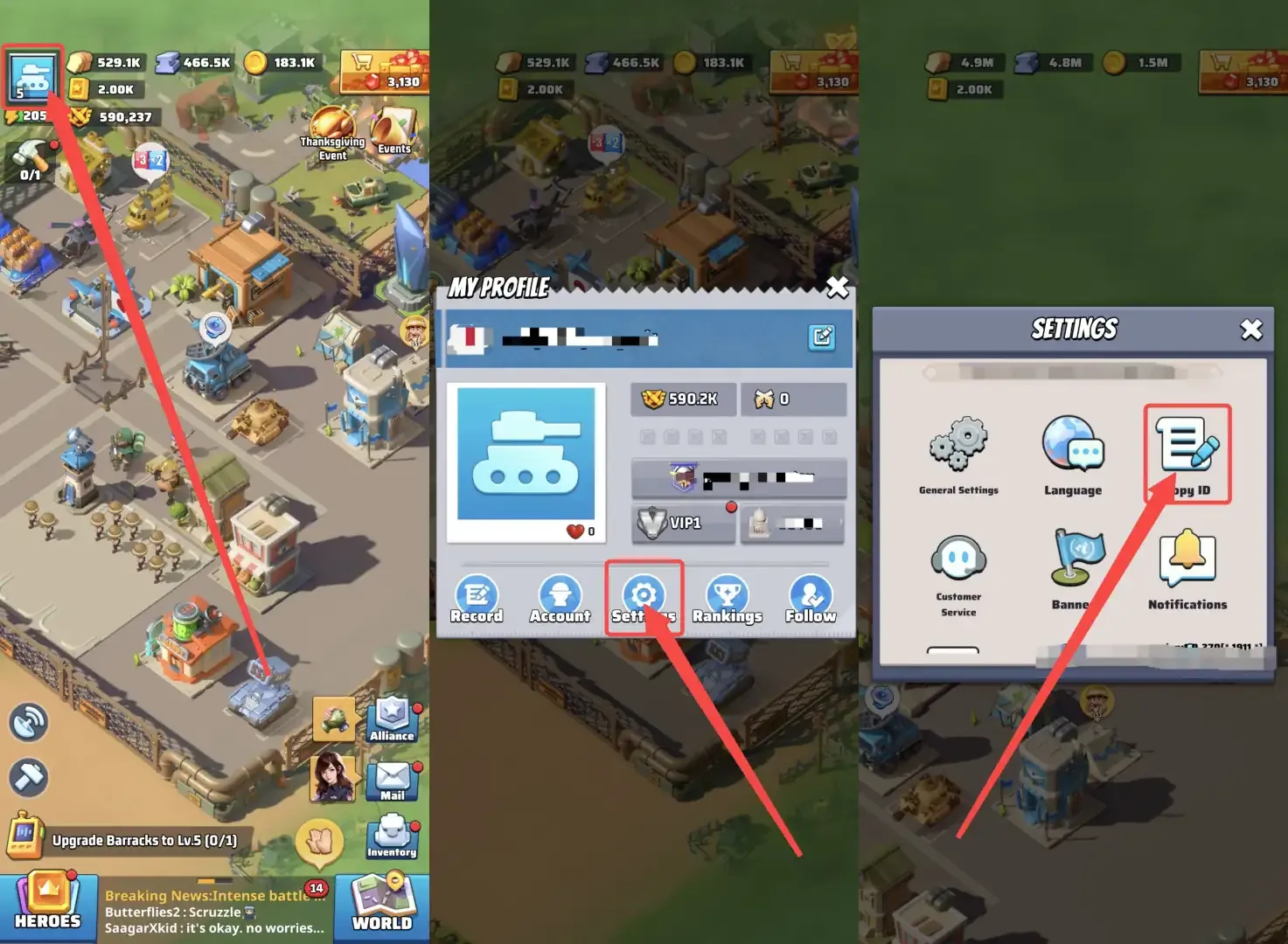
Last War UID in three steps (English UI screenshot): tap your avatar at the top-left of the main city, tap Settings in My Profile, then tap Copy ID in the red box on the settings page
English UI screenshot: avatar → Settings → Copy ID

Account linking / login method check

For third-party login, first confirm that an email is linked.

Available logins
Last War ID、Google
Linking path
1. After logging in, tap your "avatar" at the top left2. Tap "Account" at the bottom3. Tap "Register Last War ID"4. Enter the email address you want to link and tap "Send Code"5. Check your inbox for the verification code and enter it to finish linking
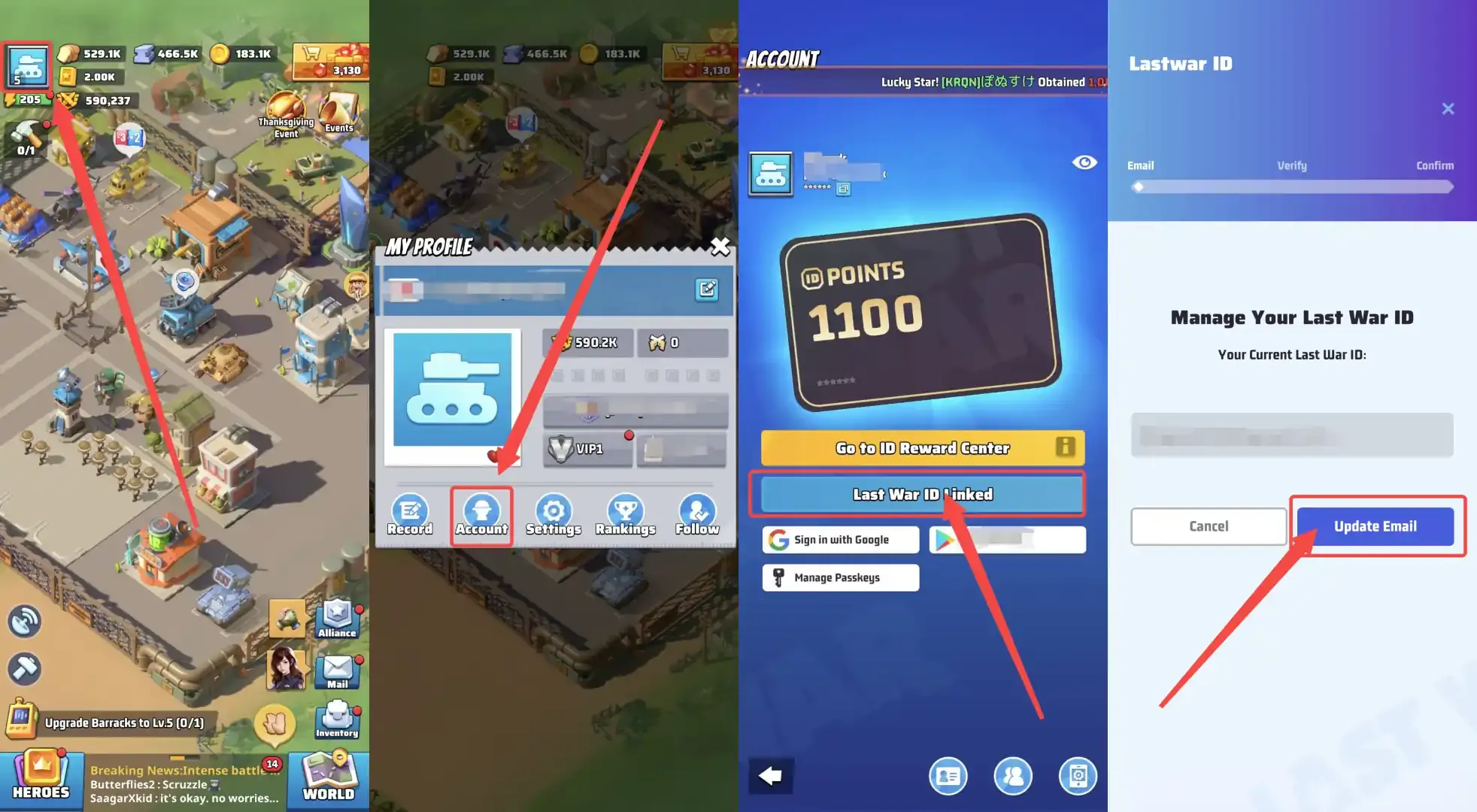
Last War email binding in four steps (English UI screenshot): tap the avatar at the top-left, tap Account at the bottom, tap the Last War ID section, then enter your email and tap Update Email
English UI screenshot: avatar → Account → Last War ID → enter email

Account security

Do

・Only submit information through the Grecharge website, Discord or customer support・Login Top-Up: provide info after payment, and change your password right after completion・Self Top-Up: always clear your login info and exit when done・After delivery, compare with the tier and confirm the quantity matches

Don't

・Do not follow instructions from strangers outside these channels・Do not place the same order repeatedly in a short time・Do not log in to the game yourself during Login Top-Up

Fees, payment and data security

Fees
Priced in local currency, fees extra; the checkout page is final.
Payment methods
Google Pay, Apple Pay, VISA, Mastercard, etc., varying by region; the checkout page is final.
Data security
Login information is used for this order only; it is deleted within 24 hours after completion, and kept for up to 7 days at most for after-sales checks.
Refunds
Virtual items are non-refundable once delivered; if not yet delivered, contact support
Scope
We only provide items that already exist in the game and do not modify game values.

2 Buying|Self Top-Up in 6 steps

After payment, complete the purchase in the cloud gaming window before its countdown ends.

1

After payment, tap the prompt on the order page

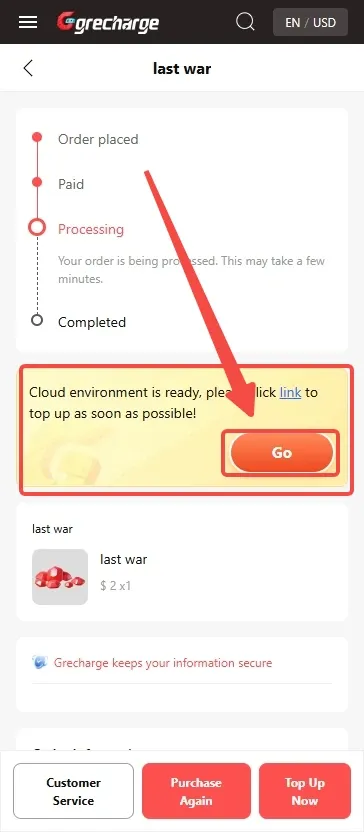
After payment, go to the order details page. When "Cloud environment is ready" appears, tap the orange "Go" button to enter cloud gaming.
Grecharge order details page (mobile screenshot): status Processing and a yellow notice saying Cloud environment is ready, the orange Go button is boxed in red
2

Or open it from Order History

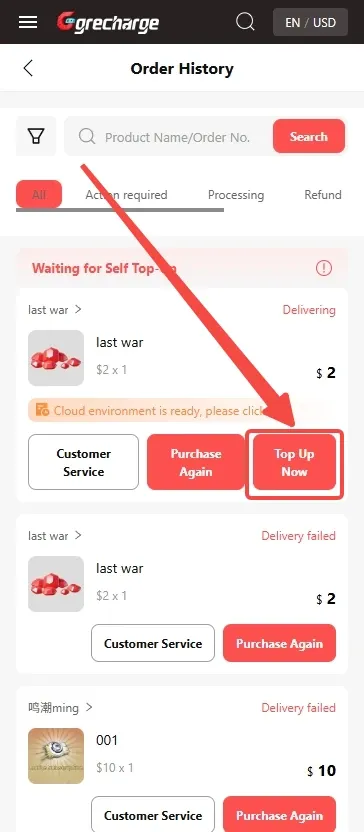
You can also go to "Order History", find the order in progress and tap "Top Up Now" in the red box on the right.
Grecharge order history page (mobile screenshot): the order shows Delivering, the Top Up Now button is boxed in red
3

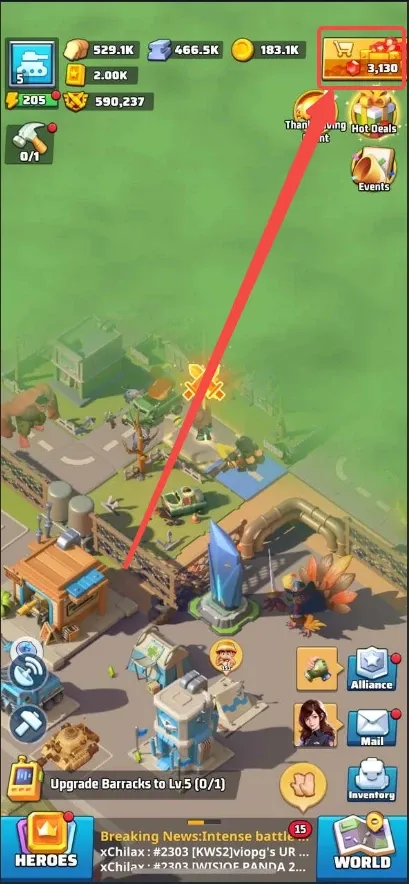
After logging in, tap the pack icon at the top right

After entering cloud gaming and logging in, tap the pack icon at the top right of the main city.
Last War main city screenshot: a red arrow and box mark the gift pack entry at the top right
4

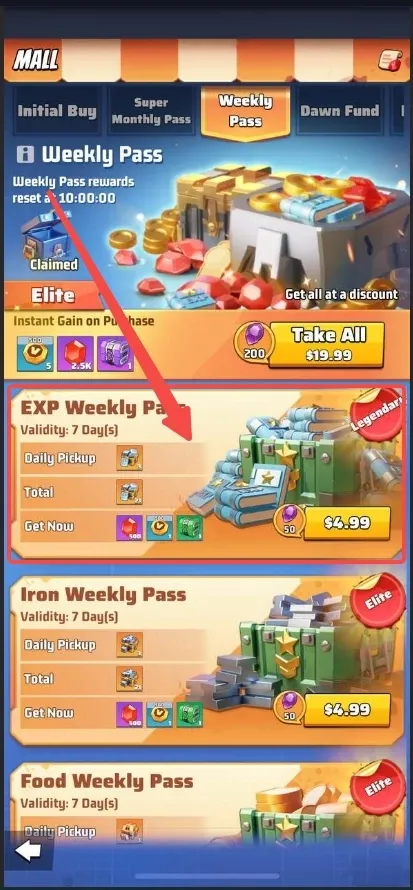
Pick the pack you paid for

Find the item you paid for on the pack page and tap the price button on the right.Pick the pack that matches the amount you paid exactly; a higher or lower one can't be purchased.
Last War gift pack shop screenshot: an arrow points to EXP Weekly Pass and the $4.99 buy button is boxed in blue; pick the pack with the same price as your payment
5

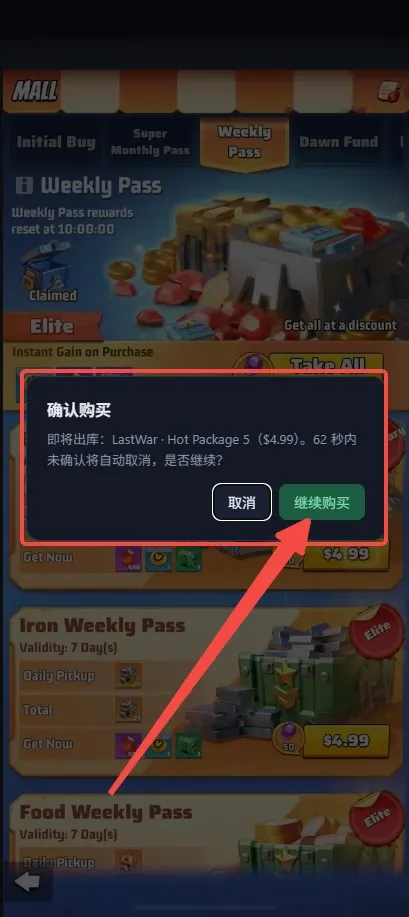
Confirm purchase

After checking the item and price, tap "繼續購買"; the window has a countdown, so finish before it ends.
Last War confirm purchase window screenshot: shows the product and price, the green Continue Purchase button is boxed in red; it cancels automatically if not confirmed in time
6

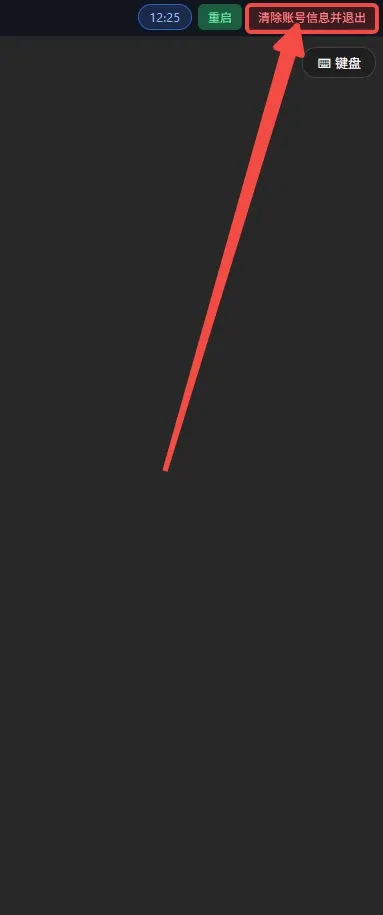
Confirm delivery, clear account info and exit

Once you've confirmed delivery in your bag or mail, tap "清除賬號信息並退出" in the red box at the top right; the cloud environment is cleared automatically.
Cloud game window top bar screenshot: the red Clear account info and exit button at the top right is boxed in red, tap it after confirming delivery
Note: only buy the specified product.Only buy the product you paid for; if you tap the wrong one, cancel first and choose the correct one.
Peace of mind:After the purchase is done and you finish, the cloud environment is cleared automatically and leaves no game login record.
Countdown timed out?If you don't enter the game before the countdown ends, the order may need to be resubmitted. Find the order in "Order Center" to continue, or contact support.

2 During|Login Top-Up (support buys) in 4 steps

The step that takes the most time is confirming that your info and pack are correct, so don't skip any step.

1

Choose a product and pay

Open the product page, choose a tier, check the amount and pay.
2

Provide login info

After payment, as support notifies you, provide game account & password / verification code, UID and a screenshot of the pack to top up; keep your inbox reachable meanwhile.
3

Wait for manual top-up

Support logs in and completes the purchase; meanwhile pleasedo not log in to the gameto avoid login conflicts.
4

Log in and confirm delivery

After the completion notice, log in, check that the contents match the screenshot, andchange your password right away。
Want to check progress after ordering?View order

Estimated delivery time

Orders accepted 24 hours a day; support speed varies by time of day.

Method
Typical delivery
Description
Self Top-Up
5–10 minutes
May vary slightly with queue. Don't close the window or log in from another location during the process. During events, timing depends on order volume, so top up early
Login Top-Up
5–30 minutes
Support logs in and buys; do not log in to the game meanwhile
Late night and event launch days may have longer queues; we suggest ordering early.

3 After|Confirm delivery; contact us if there's a problem

One last step after payment: confirmation and after-sales.

After delivery: check what you bought

Self Top-Up
After the in-game purchase, check the Rewards window plus in-game mail and bag to confirm the quantity matches what you wanted, and remember to tap "Clear account info and exit".
Login Top-Up
After support notifies you of completion, log in to the game to confirm the quantity and change your password right away.

What if the UID is wrong?

Wrong entry
Result and handling
Wrong UID but it matches a valid account
The product will be topped up to someone else's account; it usually cannot be recovered or refunded
Entered your own alt account
The product will be topped up to the alt account, not your main account
Invalid UID (account not found)
Top-up usually cannot be completed; please check the UID and reorder, or ask support for help
If you've already entered it wrong:Contact support immediately and provide the order number, transaction time and the UID you entered.

Haven't received it?

Self Top-Up
Go to "Profile → Order History" to relaunch Self Top-Up; if there's still a problem, contact Grecharge support with your order number.
Login Top-Up
Try restarting the game first. If it still hasn't arrived after the estimated time, contact support with your order number to check the order.

Why is an order delayed?

Possible reasons
Description
Account info entered incorrectly
The account, password or UID entered when ordering is wrong, so support cannot log in or the product is sent to the wrong place; please double-check
Login issue
A verification code or a different-location login check is needed; provide it as support notifies you. A different-location login notice during support login is normal
High order volume during events
During events, processing time depends on order volume; we suggest topping up early

FAQ

What's the difference between the two top-up methods?
With Self Top-Up you log in and do everything yourself, with no password to hand over. It's our recommended option; with Login Top-Up, support logs in for you.
Can I use the account during Login Top-Up?
Please don't log in to the game, to avoid clashing with support's login and interrupting your order. We suggest changing your password afterwards.
Why are prices different?
Different top-up methods have different discounts.

Ready? Place your order

Pick a product, pay, and follow the steps; contact support anytime if you run into problems.
Back to top to choose a tier

Having problems?


About the game

Basic info

Game name
Last War: Survival
Genre
Apocalypse survival, base building, strategy combat
Publisher
FUNFLY PTE. LTD
Platform
iOS/Android
Gameplay
Build your base, train heroes and form an alliance to fight zombies and other players in the apocalypse
Top-up methods
Self Top-Up, Login Top-Up (support logs in for you)
Currency
Gold & Diamonds

What are Gold and Diamonds for?

Buy packs

For limited-time and permanent packs such as the Season Pass, Dawn Fund and Monthly Card.

Speed up construction and research

Shorten building and research timers to boost your base power faster.

Train heroes

Redeem recruitment and upgrade resources to strengthen your lineup.

Why choose Grecharge?

Safe

・Support logs in for you, and login records are cleared afterwards・Order data is deleted within 24 hours

Fast

・Self Top-Up usually takes 5–10 minutes・During events, time depends on order volume; we suggest topping up early

Hassle-free

・Multiple payment methods・Support helps throughout


Why Choose Grecharge?

icon

Encrypted data, protected accounts

We use bank-level data encryption to protect your login information.

icon

Lightning-fast top-up, instant delivery

Enjoy fast top-ups, delivered in an average of 3-5 minutes after you place your order.

icon

24/7, top up whenever you need

Our automated processing system and customer support are available 24 hours a day to help whenever you need us.

icon

Official top-up quality, trusted by players

We use 100% legitimate payment sources for top-ups and follow applicable rules to protect you from the risks of stolen-card payments.

Copyright ©Hong Kong RADIATION ENTERTAINMENT CO., LIMITED
All rights reserved